
Sign up for Flodesk
A quick guide on how to sign up for your free trial or start your paid subscription plan
Flodesk offers unique creative freedom for your email marketing, allowing you to craft stunning on-brand campaigns without extensive tech or design skills.
In this guide, you'll learn how to:
Sign up for your free trial
Subscribe to a paid plan
How to sign up for your free Flodesk trial
Step 1. Go to the Flodesk website and click on Try it free / Sign up free or use a referral link from a friend.
Step 2. Enter your email address and select a password. You can also sign up using Google Single Sign On (SSO).
Step 3. Click Try it free.
Step 4. You may also receive a verification email in your inbox (check spam/junk if necessary). Click the verification link in the email to activate your account.
You can check your Plan + billing section when your free trial expires.
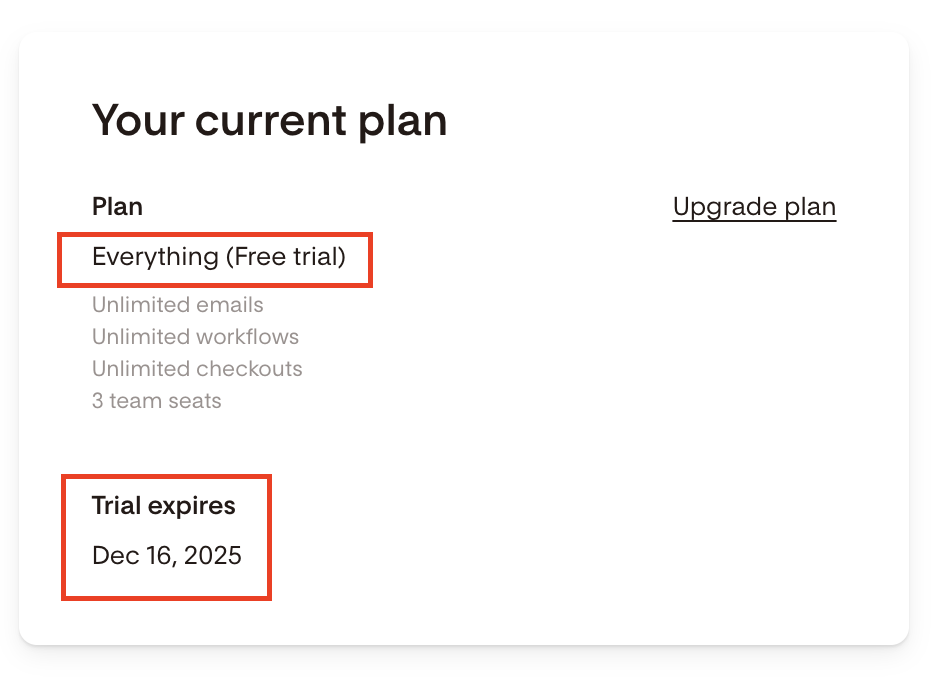
During your initial free trial, you’ll have access to our full suite of design tools and features to help you craft stunning emails and engage with your audience. However, to ensure the best experience for all trial users, email sends are capped at 500 recipients per day.
If you’re finding this limit is impacting your ability to test Flodesk for your needs, upgrading to a paid account will remove this limit and unlock all the features Flodesk has to offer, including unlimited emails with an authenticated custom domain.
How to sign up for a paid subscription plan
Once your initial free trial ends, you can
Remain on our free plan, which allows you to grow your list and includes the use of our various opt-in forms, or
Convert to a paid plan that scales with your active subscriber count.
Important: Your paid plan renews automatically unless cancelled.
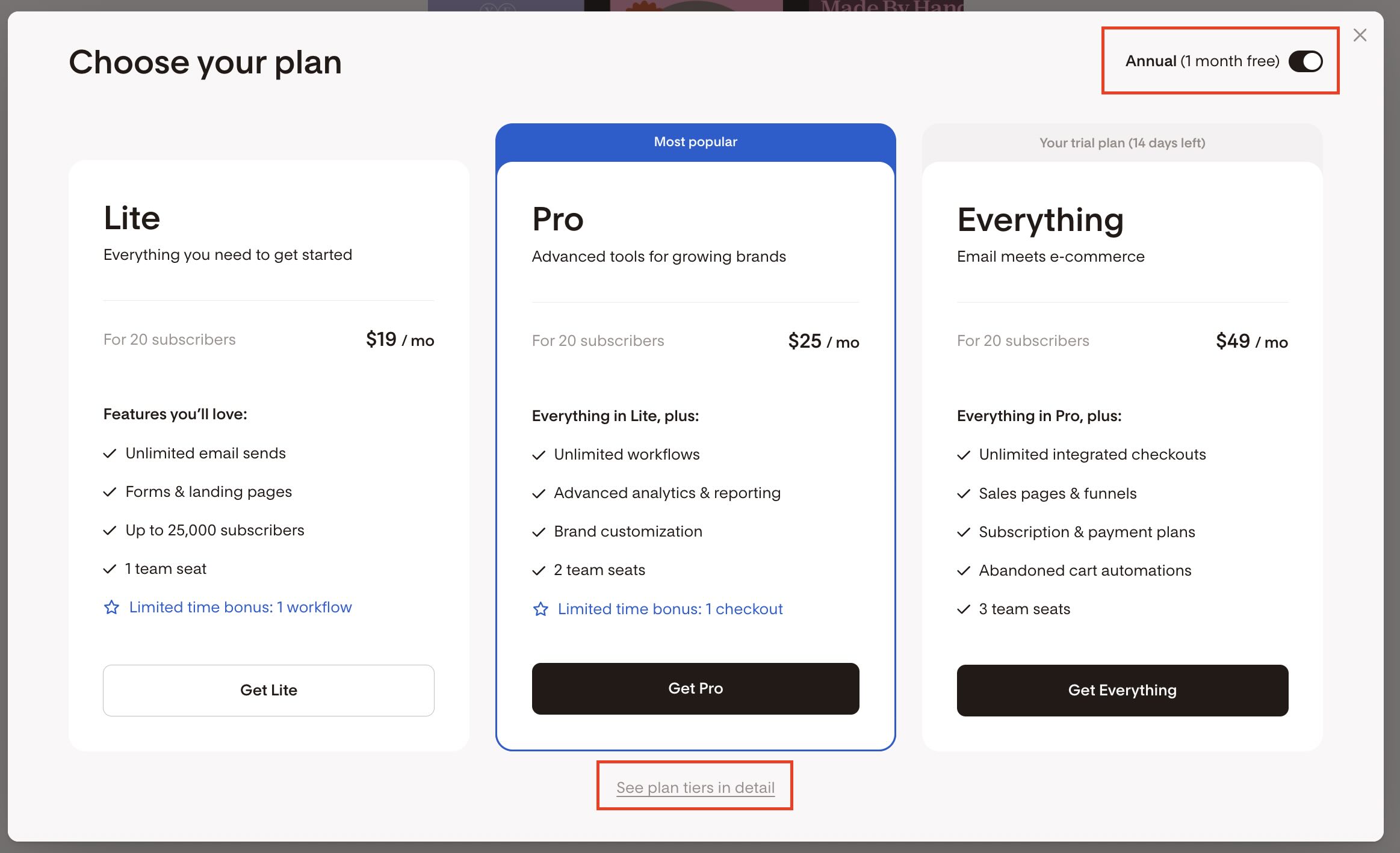
Step 1. In your Flodesk account, click your avatar in the bottom left corner of your screen and go to Plan + billing. Then choose your plan: Lite, Pro or Everything.
Note: If you only see the option to subscribe to the Everything plan, make sure to unpublish any checkouts you created during your free trial.
Step 2. Choose between monthly or annual billing (annual subscribers receive one month free). Use the toggle in the top-right corner to view the relevant monthly vs. annual prices.
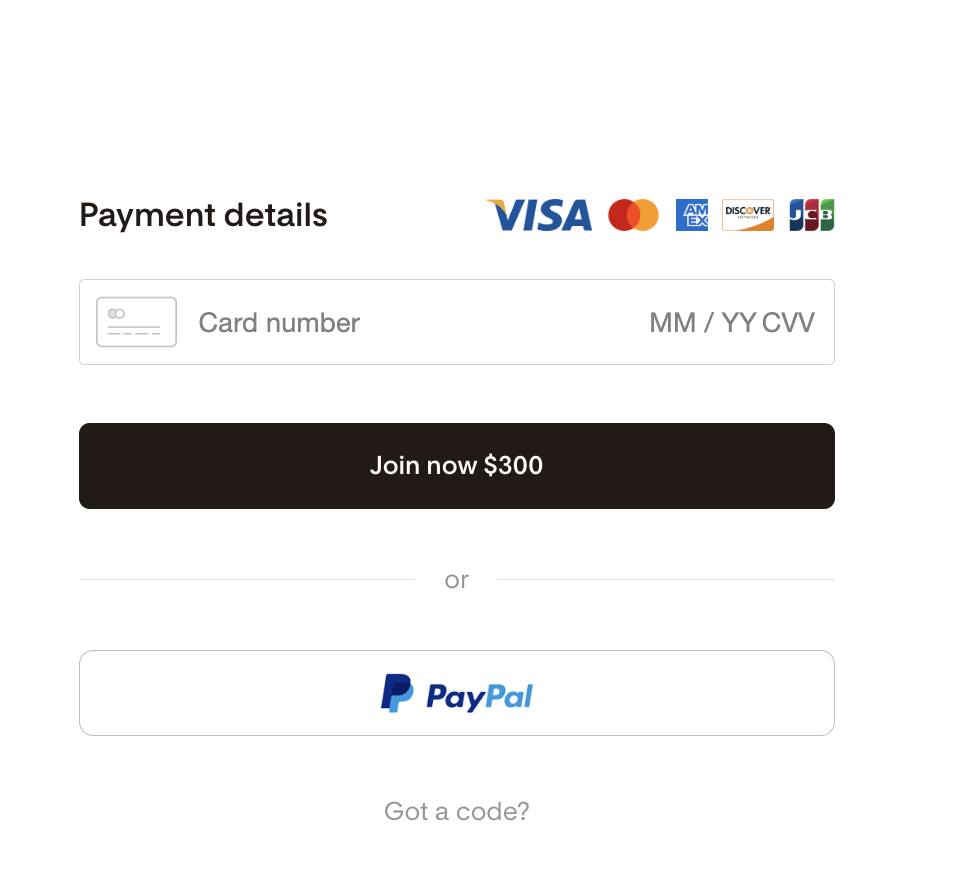
Step 3. Enter your payment details. You can pay by card or via PayPal.
If you have an affiliate/discount code, click on the "Got a code?" link, enter the code and hit apply.
Note: One code per account: Only a new member can use the code, and each new member can use only one link or code. It can not be combined with other discounts or codes.
Note: Once you convert to a paid Flodesk subscription plan, it will renew automatically unless cancelled.
If you joined via a referral/discount code, a renewal notification email will be triggered when the discount expires (applies to both monthly and annual plans).
Also, a renewal notification email will be triggered 21 days before your annual subscription renews.
Important: When paying with PayPal, you need to connect your PayPal account first.
A success message will display when it’s connected, but that doesn't complete the payment just yet.
To finish paying, make sure to go back to the prior screen in Flodesk and click the Join now button. Otherwise, your subscription won’t start.
I heard Flodesk is changing its pricing tiers and that unlimited plans will no longer be available.
Here’s what you need to know
Starting December 2, 2025, new members will see pricing that scales with their audience size.
Unlimited will no longer be available after December 1, 2025 at 11:59PM PST. Instead, we’ll offer three plans that scale with subscriber count: Lite, Pro and Everything. New members will see exactly how pricing scales and get a heads up before it happens—no hidden fees, no surprises.
Nothing changes for current members.
You’ll keep your legacy Unlimited plan for as long as you choose to keep your plan—simple as that.
I’m new to Flodesk. How can I lock in Unlimited?
With Unlimited, you’ll pay a flat rate no matter how big your list grows. You can lock in unlimited emails and subscribers by starting a paid subscription on or before December 1, 2025 at 11:59PM PST.
What happens if I cancel or switch plans later?
Once Unlimited is gone, it’s gone. If you cancel or switch to a different plan after December 1, 2025 at 11:59PM PST (including downgrading to remove Checkout), you won’t be able to get unlimited emails and subscribers back—even if you return later.
What if I want to upgrade my plan before the pricing change? Will I stay locked in to unlimited emails and subscribers?
If you’re already paying for an unlimited plan and upgrade to add Checkout by December 1, 2025 at 11:59PM PST, you’ll stay locked in to unlimited emails and subscribers for as long as you choose to keep your plan.
If you decide to downgrade and remove Checkout after December 1, 2025 at 11:59PM PST, you’ll need to choose from one of our new plans without unlimited emails and subscribers.
If I keep my current plan but switch between monthly and annual billing after December 1, 2025 at 11:59PM PST, will I stay locked in to unlimited emails and subscribers?
If you want to switch between monthly and annual billing without losing access to unlimited emails and subscribers, reach out to our Member Experience team. We’ll make sure you’re still locked in for as long as you keep your current plan.
I'm an existing member and don't need e-commerce features. Do I need to upgrade my plan to Checkout to lock in unlimited?
No, there’s no need to upgrade to a plan with Checkout if it’s not what you’re looking for. If you’re already paying for an unlimited plan (email only/pro), nothing changes. You’ll keep unlimited emails and subscribers for as long as you choose to keep your plan—no action needed.
What happens if you upgrade but later remove Checkout?
If you upgrade to a plan that includes Checkout, you can always downgrade again later. However, it’s important to know that Unlimited plans will no longer be available after December 1, 2025 at 11:59PM PST.
If you change your subscription to either add or remove Checkout, you will not be able to transfer your unlimited emails and subscribers over from your legacy plan. You'd be moving to our new plans based on subscribers.
Summary
To start your free Flodesk trial head to Flodesk, click Try it free (or click on an invitation link, if you have one), enter your email and password, verify your email and you’re all set.
During your initial free trial, to ensure the best experience for all trial users, email sends are capped at 500 recipients per day.
If you’re finding this limit is impacting your ability to test Flodesk for your needs, upgrading to a paid account will remove this limit and unlock all the features Flodesk has to offer, including unlimited emails with an authenticated custom domain.
To start a paid subscription plan, go to Plan + billing, choose your subscription plan, decide if you'd like to pay monthly or annually and fill in your payment details.
Once you convert to a paid Flodesk subscription plan, it will renew automatically unless cancelled.