
How Flodesk email tracking works
Overview
On April 14, 2026, France's data protection authority (the CNIL) published a binding recommendation on email tracking pixels. Starting July 14, 2026, businesses generally need prior, explicit, and separate consent from recipients before tracking email opens and clicks, unless an exemption applies. Italy's data protection authority (the Garante) has issued a similar recommendation for tracking pixels in email, with an effective date starting in October 2026.
These recommendations apply to emails sent to contacts based in France or Italy, even if your business is located somewhere else.
To help you manage this, Flodesk now offers two controls:
An account-level toggle that turns off open and click tracking for every email you send.
Subscriber-level preferences that let individual subscribers opt out of tracking for themselves.
The table below lists the trackers Flodesk uses (or offers to you for you to use) in your emails, what it does, what data it collects, and whether you have a consent control for it today. We want you to have enough detail to decide for yourself whether each tracker needs consent under this recommendation, so please read the table closely rather than just the summary.
We're not able to provide legal advice, and this article isn't a substitute for consulting your own legal counsel about how this recommendation applies to your business.
What tracking technology Flodesk uses in your emails
# | Tracker | What is it? | Data captured | Purpose | Consent control today |
A1 | Email open pixel | Two implementations:
| Email opened (by recipient), timestamp, approximate location, and device ID | Deliverability analytics | Account-level toggle (Data and privacy), plus subscriber-level opt-out (preferences page or CSV upload) |
A2 | Email click tracking | Link redirect/wrapping. Same two implementations as A1 | Link clicked (by recipient), timestamp, IP address, user-agent string | Deliverability analytics | Account-level toggle (Data and privacy), plus subscriber-level opt-out (preferences page or CSV upload) |
A3 | Opt-in per-link affiliate / ad-network tag (data-mediavine-tracking-enabled) | Affiliate click attribution for that link, plus the subscriber's email address disclosed to Mediavine in plaintext in the URL path: https://urls.grow.me/{base64 original url}/e/{subscriber email} | Affiliate attribution linked via Mediavine’s Grow network | Opt-in per link; default is OFF |
How this recommendation affects you
Because the open pixel and click tracking are used only for deliverability analytics, we believe, that per the French and Italian recommendations, this use is exempt from the new consent requirements for:
transactional emails, and
emails your subscribers already consented to receive.
We understand these recommendations have raised real concerns for members who send to subscribers in France and Italy, and we hear you. We also want to be transparent: the responsibility for compliance ultimately sits with you as the sender, not with Flodesk, and we can't tell you how the recommendations apply to your specific business.
How to control email tracking
Turn off tracking for your whole account
You can turn off open and click tracking for every email you send from your account.
Go to your account settings and select Data and privacy.
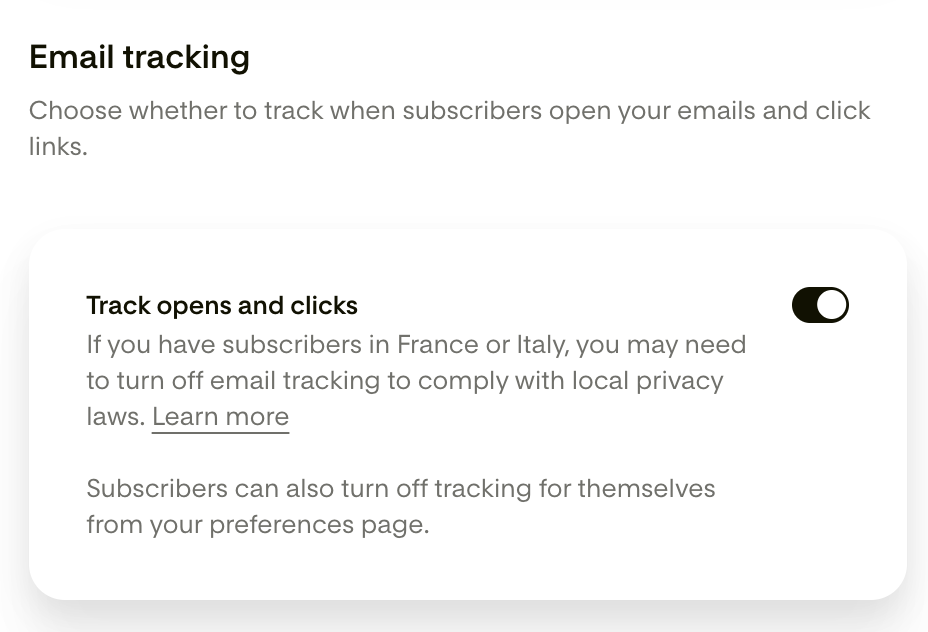
Find the Email tracking card.
Turn the toggle off.
By default, this toggle is set to on, so tracking happens automatically unless you turn it off.
A few things to know before you do:
This only affects future sends. Historical tracking data already collected isn't changed or removed.
If you use Workflows with conditions based on opens or clicks, or Link Actions that rely on this data, they may not work as intended once tracking is off.
Once it's off, opens and clicks won't show up in your email or workflow analytics. You'll see a message on those pages reminding you that tracking is turned off.
Your open rate and click rate will drop (often to zero) once tracking is off, since those figures are calculated from the opens and clicks Flodesk can no longer record. This isn't a sign your emails are performing worse, it just means that activity isn't being measured anymore.
This toggle is available on all Flodesk plans that include sending emails. It isn't available on the free plan.
Only account Admins can turn this toggle on or off. If you're a Manager or Editor on a team account, you won't see the Data and privacy tab.
If you use resend to unopens, turning off tracking means those subscribers will show up as not having opened, even if they did. We recommend avoiding this feature while tracking is off.
The pre-built Unengaged subscribers segment relies on opens and clicks to identify inactive subscribers. While tracking is off, subscribers won't generate that activity data, so this segment may not accurately reflect who's actually unengaged.
If you've turned on Mediavine Grow Email Connect for any links, this account-level toggle doesn't affect it. Mediavine tracking is controlled separately, per link, and is off by default.
Let your subscribers manage their own tracking preference
If you'd rather leave account-wide tracking on but still give individual subscribers a choice, you have two options.
Option 1: Preferences page
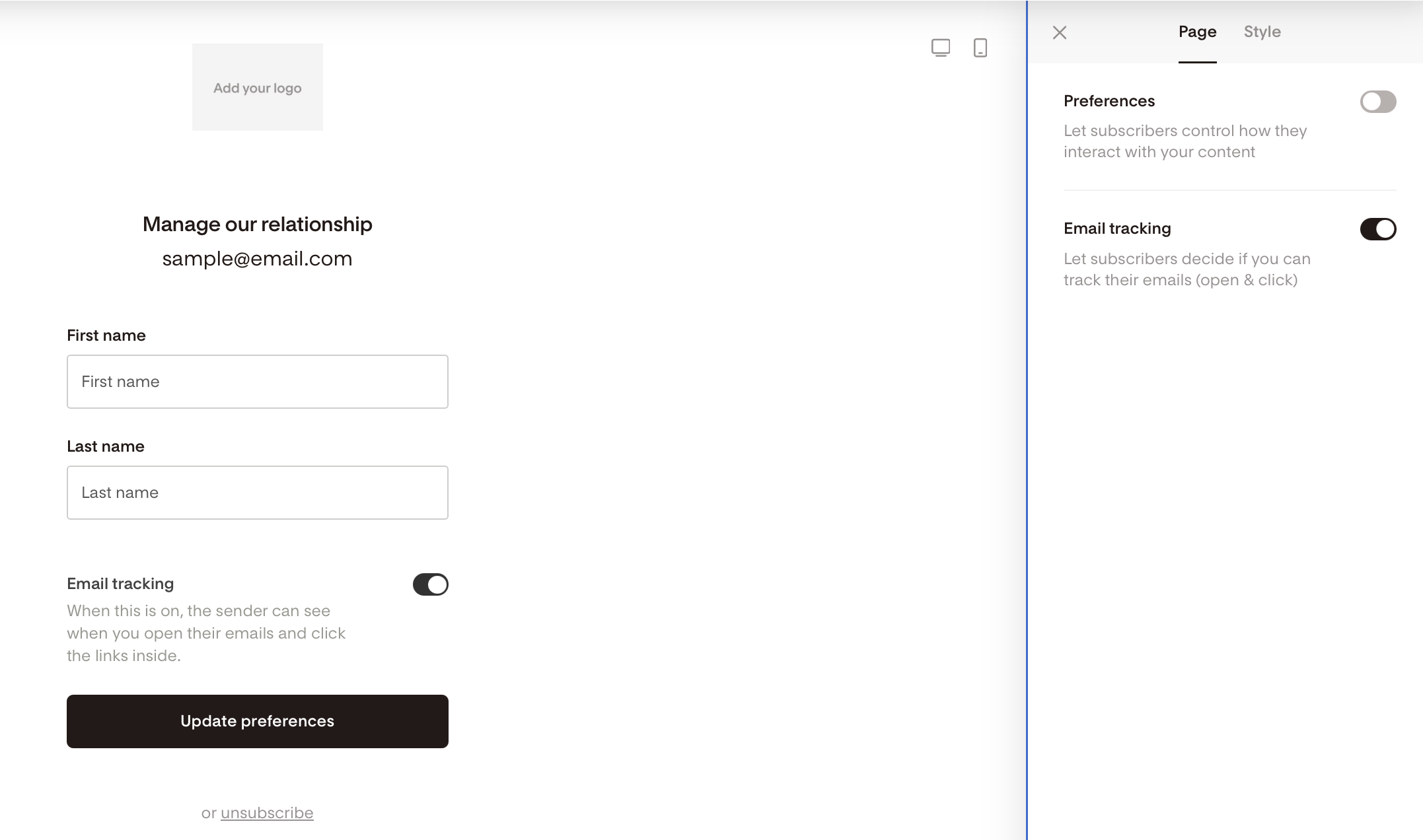
Your subscribers can turn tracking off for themselves from your preferences page, the same page linked from your email footer where they manage what they want to hear from you about.
To let subscribers see this option, you'll need to turn it on yourself:
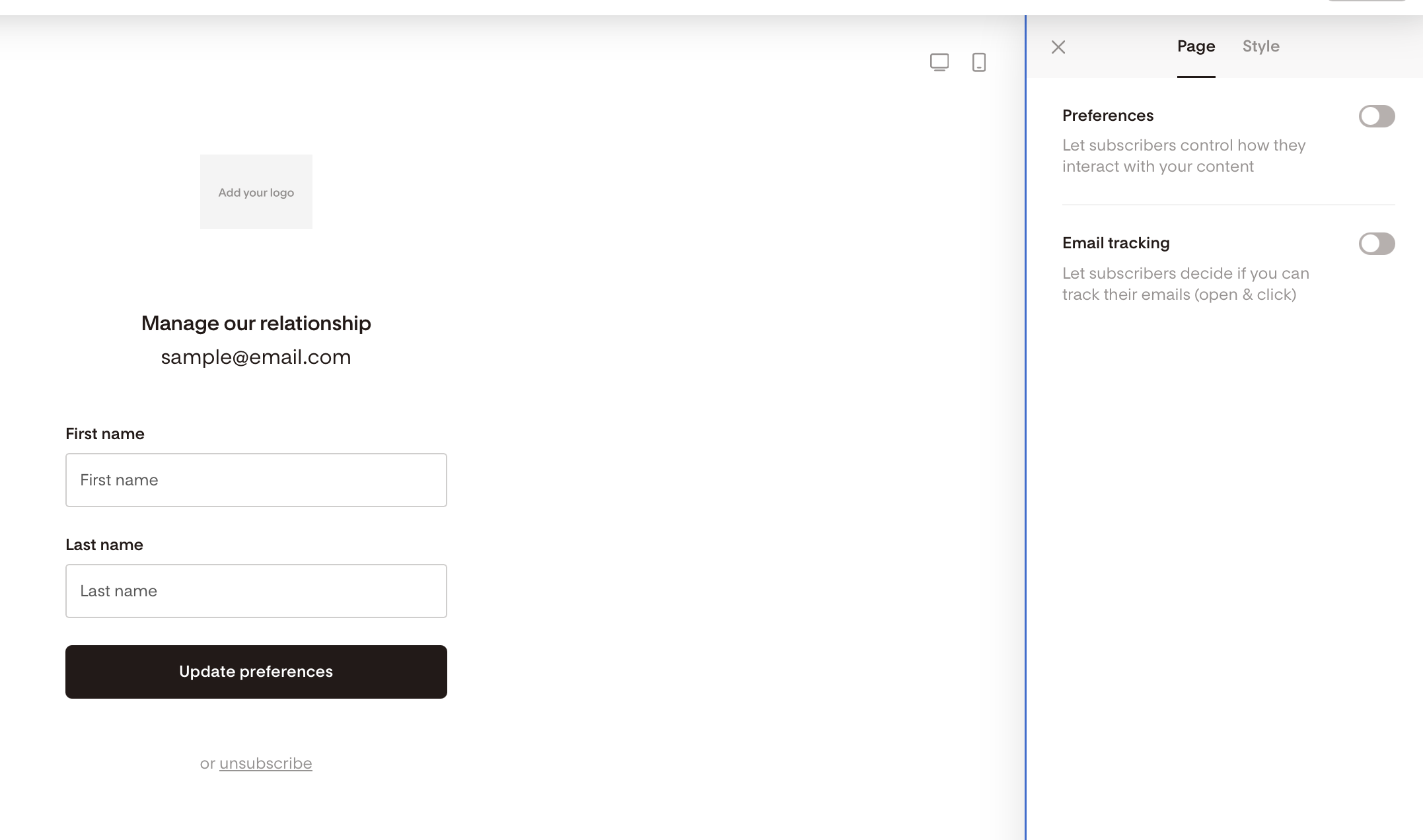
Go to Account settings > Opt-in setup and open your Preferences page builder.
Under Global styles, turn on Email tracking.
Option 2: CSV upload
When you upload a CSV, name the column header that contains your subscribers' email tracking consent "Email tracking". During upload, you'll map that column to Flodesk's Email tracking field. Flodesk reads the values in your column as follows:
Leave the column out, or leave a row blank, and that subscriber defaults to tracking ON.
Enter OFF for a subscriber to opt them out of tracking on upload.
See which subscribers have turned tracking off
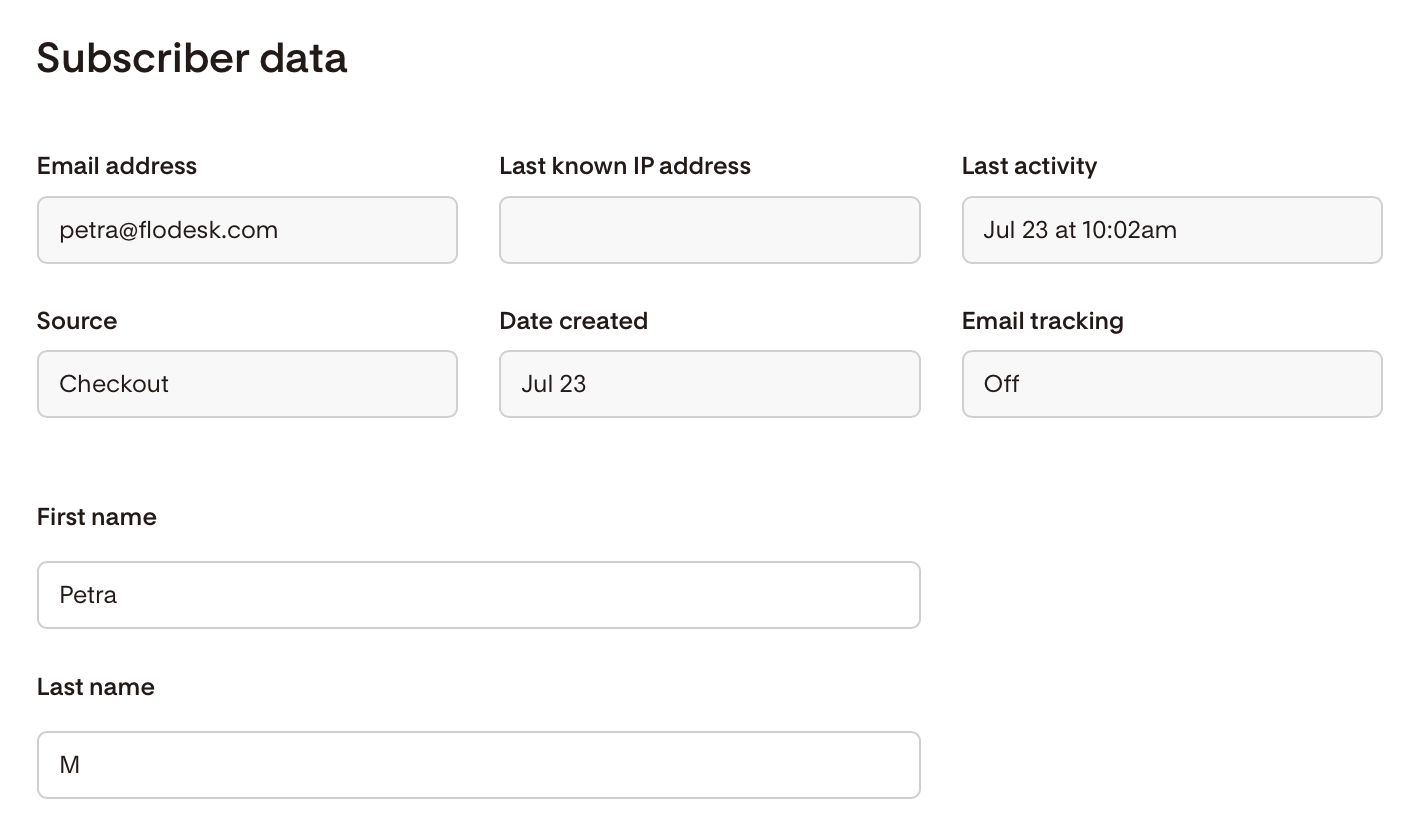
On an individual subscriber's profile, you'll see an Email tracking: Off field if that subscriber has opted out (whether through the preferences page or a CSV upload). If a subscriber hasn't opted out, this field won't show at all.
How account-level and subscriber-level settings work together
If your account-level toggle is off, none of your subscribers are tracked, no matter what their individual preference is.
If your account-level toggle is on, tracking follows each subscriber's individual preference: subscribers who've opted out aren't tracked, and everyone else is tracked normally.
In every case, changes only apply going forward. Data you've already collected isn't changed retroactively.
What's coming
Subscriber location field (exploring)
We're exploring adding a location field for each subscriber, populated by Flodesk, so you have visibility into where your subscribers are located. We want to flag a limitation upfront: Flodesk doesn't routinely collect location data, and the location data we do get from the open pixel isn't reliable, so we may not be able to populate this field consistently.
FAQs
Do these recommendations from France and Italy apply to all of my subscribers?The recommendations apply to emails sent to contacts based in France or Italy, regardless of where your business is located.
Do I need to do anything right now?
We don’t believe you do, but again, we are not your attorneys and we can not provide you any legal advice. As such, we have provided you with the ability to turn off tracking for your entire account from Data and privacy, or let individual subscribers opt out through your preferences page or a CSV upload. If you've enabled Mediavine Grow Email Connect on any links, you can also turn that off per link.
Will turning off tracking affect my Workflows?
Yes. If you use Workflows with conditions based on opens or clicks, or Link Actions that rely on this data, turning off tracking may prevent them from working as intended.
Can my subscribers opt out of tracking individually?
Yes, if your account-level toggle is on. They can do this from your preferences page (once you've turned that option on), or you can set their preference for them when you upload a CSV.
What happens if my account-level toggle is off, but a subscriber has tracking on?
The account-level toggle always takes priority. If it's off, no subscribers are tracked, regardless of their individual settings.
Will this affect analytics I've already collected?
No. Changes to tracking settings, at the account or subscriber level, only apply to future sends. Data already collected stays as is.
What happens if a subscriber opens an email I sent before I turned off tracking?
The open still gets tracked. Once an email is sent, it already contains the tracking pixel, so turning off tracking afterwards can't change how that email behaves once it's in a subscriber's inbox. The toggle only applies to emails you send after you turn it off.
What happens if I turn off tracking after scheduling an email to send later?
Scheduling an email doesn't lock in your tracking setting at the time you schedule it. Flodesk checks your account's tracking setting the moment the email actually sends. So if you schedule an email today and turn tracking off before it goes out, no opens or clicks will be tracked when it sends later.
Who can turn account-level tracking on or off?
Only Admins on your account. Managers and Editors won't see the Data and privacy tab.