
Understanding your pre-built “Unengaged Subscribers” segment
Overview
Your Unengaged Subscribers segment is a pre-built segment that Flodesk automatically creates for you. It surfaces the subscribers on your list who've stopped interacting with your emails, so you can keep your list healthy and make sure your emails keep landing in inboxes.
This segment never deletes, archives, or changes your subscribers, and anyone who starts engaging again is automatically removed from it.
Note that some inbox providers block open tracking, so a subscriber who reads every email can still appear unengaged.
What is the Unengaged Subscribers segment?
“Unengaged Subscribers” is the first pre-built segment Flodesk has added to your account. It's designed to help you spot subscribers who are no longer opening or clicking your emails, so you can decide what to do with them.
Why does this matter?
When you regularly send to people who never engage, email providers like Gmail and Outlook start to notice. Over time, this can hurt your sender reputation, cause your emails to land in spam, and make your open rates misleading. Archiving unengaged subscribers is one of the best things you can do to protect your deliverability and keep your stats accurate.
Important: This segment is not meant for sending, including re-engagement campaigns. These subscribers already aren't opening or clicking, so sending to them directly (even to try to win them back) can hurt your sender reputation: inbox providers now weigh engagement heavily when deciding whether your emails land in the inbox or the spam folder.
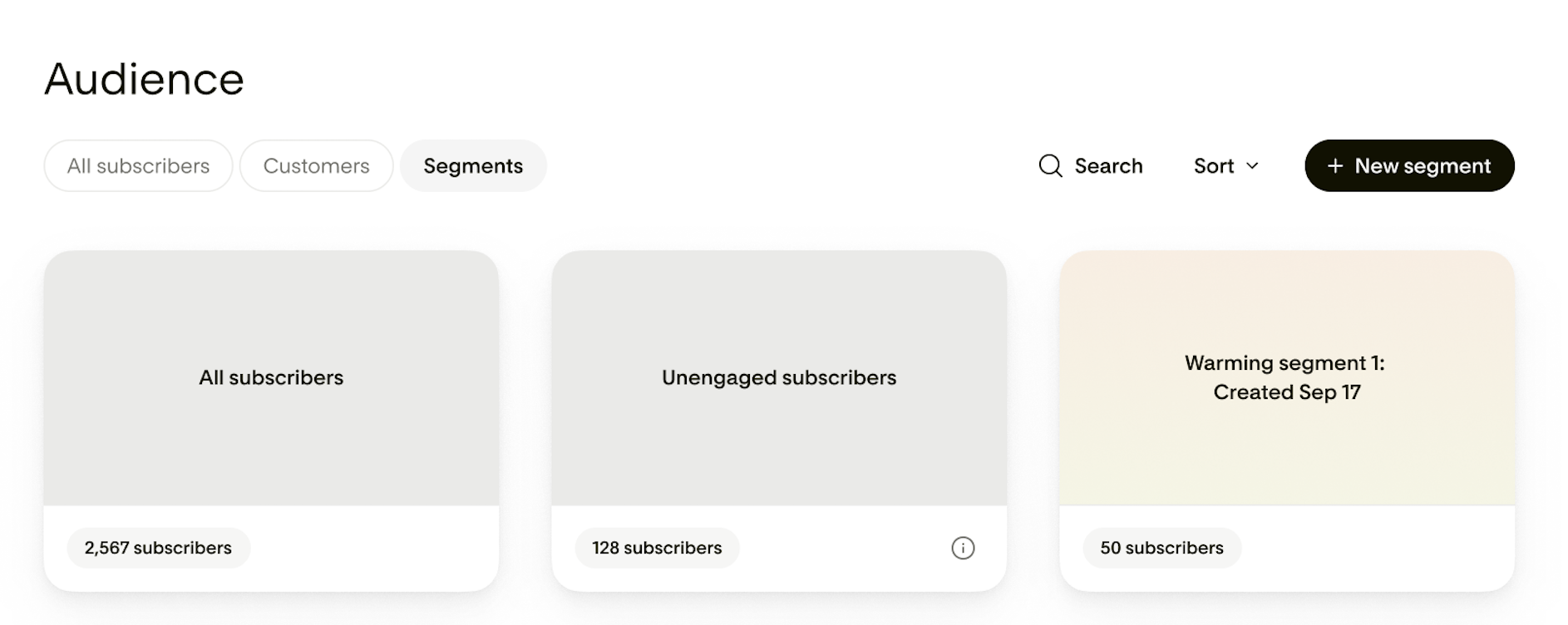
Who shows up in this segment?
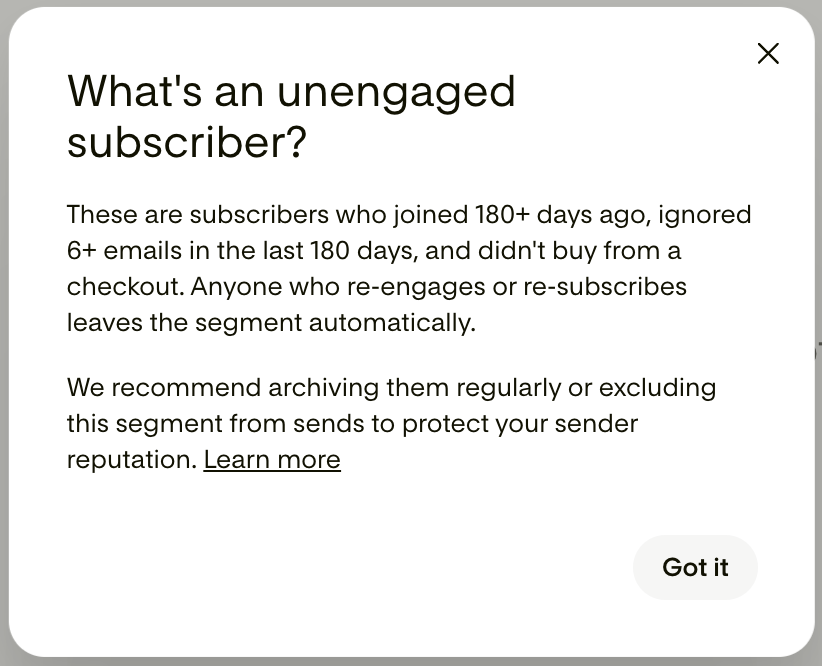
A subscriber appears in the Unengaged Subscribers segment when all of the following are true:
Their status is Active
They haven't opened or clicked any of your emails in the last 180 days
They've received at least 6 emails from you in the last 180 days
They joined your list more than 180 days ago
In other words, these are subscribers who've had multiple chances to engage, have been on your list long enough to settle in, and are consistently choosing not to interact. That's a clear signal it may be time to archive them.
Note: Anyone who opens, clicks, makes a purchase through Flodesk checkout, or re-subscribes through one of your forms or integrations moves out automatically.
How we measure engagement
Opens and clicks are the two primary signals behind this segment, and it helps to know how each one is tracked, because neither is perfect.
An open is counted when a tiny, invisible image loads inside your email. A click is counted separately, through the links themselves. Because they work in different ways, the two numbers don't always line up:
Some inbox providers and privacy settings block that invisible image, so a subscriber who reads every email can still look like they never opened one. This undercounts opens.
Others, like Apple Mail Privacy Protection, load the image automatically whether or not the person actually opened your email. This can make opens look higher than they really are.
A subscriber can also click a link without ever registering an open, usually because their email app blocks images but still follows links. A click is the stronger signal here: if someone clicked, they engaged, even when the open didn't record.
Because opens on their own can mislead in both directions, this segment never relies on them alone. A subscriber only appears here when there's no sign of any opens or clicks across at least six emails over 180 days. Requiring a long window, multiple sends, and no clicks (not just no opens) filters out most of the false "unengaged" cases that tracking gaps can cause.
You're also always in control. If you know someone is still engaged even though they show up here, you can deselect them before you archive, so no one is removed unless you say so.
How pre-built segments work
Pre-built segments are dynamic, which means they update automatically based on your subscribers' activity.
You don't need to rebuild or refresh them.
Whenever you open the Unengaged Subscribers segment, you're always looking at the most current list.
A subscriber who shows up today might not appear next month if they start engaging again, and vice versa.
How to clean your list
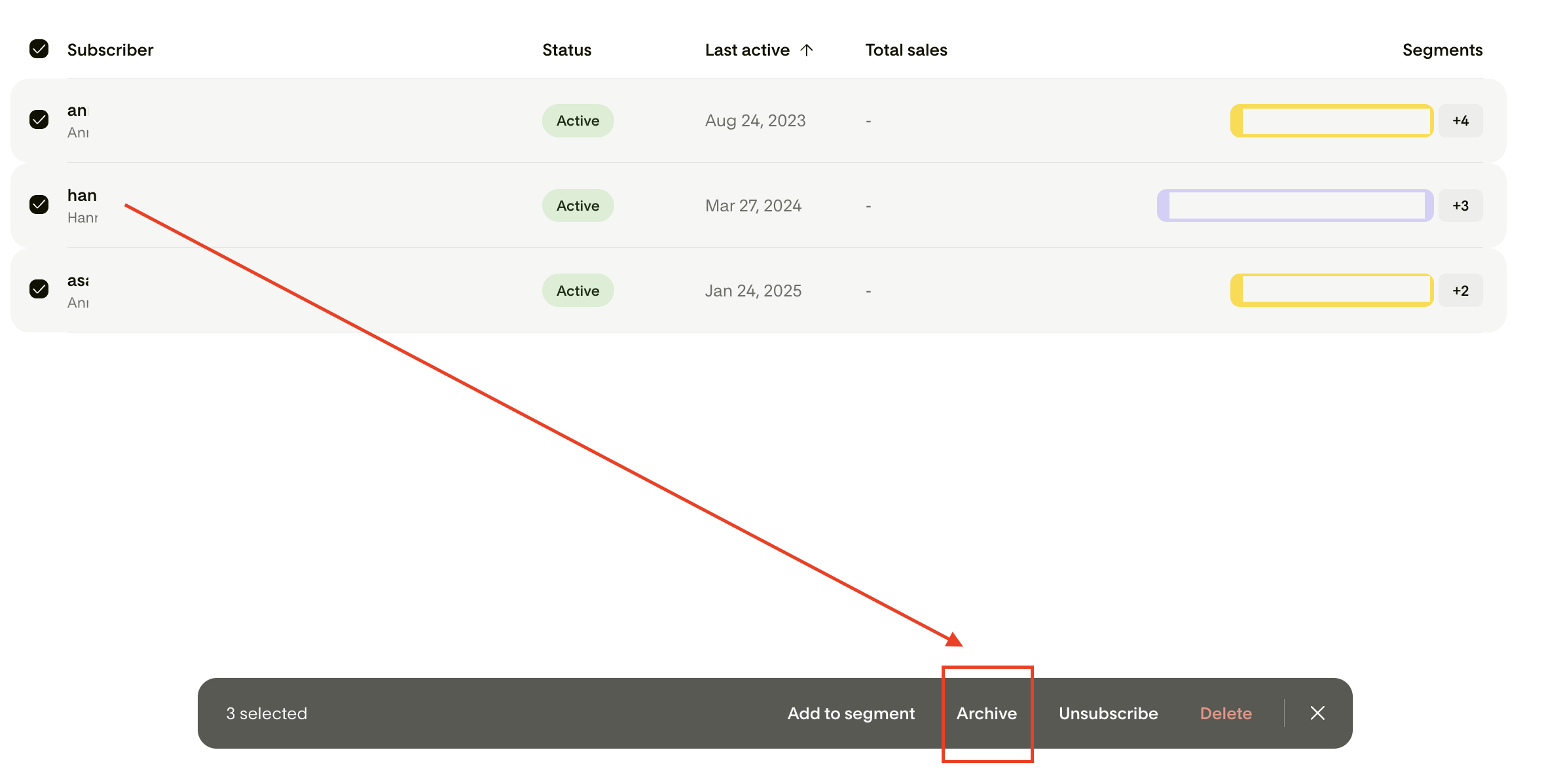
Once you're in your Unengaged Subscribers segment, you can take action on the entire list or select specific subscribers. From there, you can archive them in bulk using the bulk action menu.
Archiving moves subscribers out of your active list without permanently deleting them. If you ever need to find them again, you can, and the action can be undone.
How often to clean
Flodesk recommends archiving your Unengaged Subscribers once a month. A monthly cadence keeps your list healthy without making it feel like a chore, and it catches disengagement early, before it starts affecting your inbox placement.
Each time you open the segment, it will reflect any changes you've already made and show you anyone new who's drifted into the unengaged window since your last cleanup.
A few things to know about pre-built segments
Pre-built segments behave a little differently from segments you create yourself:
They're pinned to the top of your Segments tab and shown with a grey card background, so they're always easy to find.
They can't be renamed, recolored, or deleted.
You can't edit the filter criteria, but you can open the filter view to see exactly how the segment is defined.
If you already have a segment named "Unengaged Subscribers," your version is automatically renamed to "Unengaged Subscribers (Custom)" so the two don't conflict.
If there are no subscribers in the segment, you'll see the message: "No subscribers found." This is good news and indicates an actively engaged list.
FAQ
What is the Unengaged Subscribers segment?
It's a pre-built, automatically updating segment that shows you active subscribers who haven't opened or clicked your emails in the last 180 days, have received at least 6 emails in that window, and joined your list more than 180 days ago. Anyone who opens, clicks, makes a purchase through Flodesk checkout, or re-subscribes through one of your forms or integrations moves out automatically.
Someone clicked my email, but it says they didn't open it. How is that possible?
Opens and clicks are tracked in two different ways. An open relies on a small invisible image loading in your email, while a click is tracked through the link itself. If a subscriber's email app blocks images, that image never loads, so no open is recorded, but their click still comes through. In that case, the click is the more reliable signal: they clearly engaged. This is also why the segment looks at both signals together. A subscriber counts as unengaged only when there's no record of any opens or clicks over the full 180-day window, so someone who clicked won't be flagged as unengaged based on opens alone.
Why should I clean my list?
Sending emails to subscribers who never engage can damage your sender reputation and cause your emails to land in spam instead of the inbox. Regular list cleaning helps maintain healthy inbox placement, reduces spam complaints, and keeps your open and click rates accurate.
What does archiving a subscriber do?
Archiving moves a subscriber out of your active list, but doesn't permanently delete them. Archived subscribers won't receive your future emails, but you can still find them and restore them if needed.
Can I undo an archive action?
Yes. Archiving is reversible. If you accidentally archive someone, you can find them and restore them to active status.
Will the segment update on its own?
Yes. The Unengaged Subscribers segment is dynamic and updates automatically based on subscriber activity. You'll always see the most current list when you open it.
Can I edit or delete the Unengaged Subscribers segment?
No. Pre-built segments can't be renamed, recolored, edited, or deleted. You can view the filter criteria, but you can't change them.
What if I already have a segment called "Unengaged Subscribers"?
Your existing segment will be automatically renamed to "Unengaged Subscribers (Custom)" so there's no conflict with the pre-built version.
How often should I clean my list?
Flodesk recommends reviewing and archiving your unengaged subscribers once a month. This keeps your list healthy without making it feel overwhelming.
What if the segment is empty?
If there are no subscribers in the segment, you'll see a message letting you know there's nothing to clean up right now. That's a good sign.
Can I use the Unengaged Subscribers segment in a workflow?
Pre-built segments aren't available in workflows. They can be used when selecting recipients for a single email campaign, including both include and exclude options. However, we strongly recommend not emailing subscribers who show up in your unenaged subscribers segment.
Is it safe to send an email or re-engagement campaign to my entire unengaged segment at once?
No. Sending to a whole segment of already-disengaged subscribers at once carries real deliverability risk. If you want to attempt to re-engage these subscribers, start with a very small test batch, watch your open rate and spam complaints closely, and only expand in small waves if that test comes back clean. For subscribers who have been inactive for six months or more, consider archiving them directly rather than re-engaging.