
Email authentication requirements: what Flodesk members need to know
Overview
Gmail, Yahoo, and Microsoft (Outlook, Hotmail, Live.com) have introduced stricter rules about who can send emails to their users. Think of it like a bouncer at the door: inbox providers now check whether you can prove you are who you say you are before letting your emails through. If you can't prove it, your emails get turned away at the door, or sent straight to spam.
The good news: most of what's required is a one-time setup, and Flodesk handles a lot of it for you. This article explains what you need to know and what (if anything) you need to do.
Why inbox providers now require authentication
Spam and phishing emails are a massive problem. Bad actors regularly send emails pretending to be legitimate businesses to trick people into clicking dangerous links or handing over personal information.
To fight this, major inbox providers now require all senders to prove their identity. The way you prove it is through a set of technical records you add to your domain, called SPF, DKIM, and DMARC. These act like a verified ID badge for your emails. When inbox providers see those records, they know your emails are genuinely coming from you and not from someone impersonating you.
This isn't just a technical formality. Without these records in place, your emails are more likely to be treated as suspicious, regardless of how good your content is. Getting authenticated protects your subscribers from fraud and protects your emails from being blocked.
What this means for you
Here's a plain-language summary of what's now required, and whether it applies to you:
Every sender using a custom domain:
Prove your identity with at least SPF or DKIM authentication (ideally both)
Keep your spam complaint rate below 0.10%
Bulk senders (5,000 or more emails per day): All of the above, plus:
Send from a custom domain (a free email address like gmail.com or yahoo.com is no longer sufficient at this volume)
Have both SPF and DKIM set up
Have a DMARC policy in place
Include a one-click unsubscribe link in all marketing emails
These requirements are fully enforced as of today. Non-compliant emails can be permanently bounced or sent directly to spam, with no retry.
What Flodesk handles for you
You don't have to figure all of this out alone. Flodesk already takes care of two important things:
One-click unsubscribe: every email you send through Flodesk already includes the technical code required for one-click unsubscribe. You don't need to set anything up for this.
A safety net for free email addresses: if you're not yet using a custom domain, Flodesk will rewrite your sender address so your emails go out from one of Flodesk's own verified domains. Think of it like borrowing a trusted friend's address while you're getting your own set up. This keeps your emails deliverable in the meantime, but it's not a permanent solution.
What you need to set up yourself
If you're using a free email address (gmail.com, yahoo.com, hotmail.com, and so on):
This is the most important thing to address. Free email addresses can't be properly authenticated, which puts your deliverability at serious risk. Inbox providers are increasingly skeptical of mass emails sent from free addresses because spammers use them so frequently.
Getting your own custom domain (something like hello@yourbusiness.com) and authenticating it is the single biggest step you can take to protect your email marketing. It's like the difference between handing someone a business card with your real name and address on it, versus a note with no return address. One builds trust, the other raises red flags.
If you already have a custom domain:
Make sure it's fully authenticated in Flodesk. The minimum you should have in place is:
SPF: confirms Flodesk is allowed to send emails on your behalf. Think of it as adding Flodesk to your approved senders list.
DKIM: adds an invisible digital signature to every email you send, proving it hasn't been tampered with in transit. Think of it like a wax seal on an envelope.
DMARC: a policy that tells inbox providers what to do if someone tries to send emails pretending to be you. At minimum, set it to p=none to start, which monitors for issues without blocking anything.
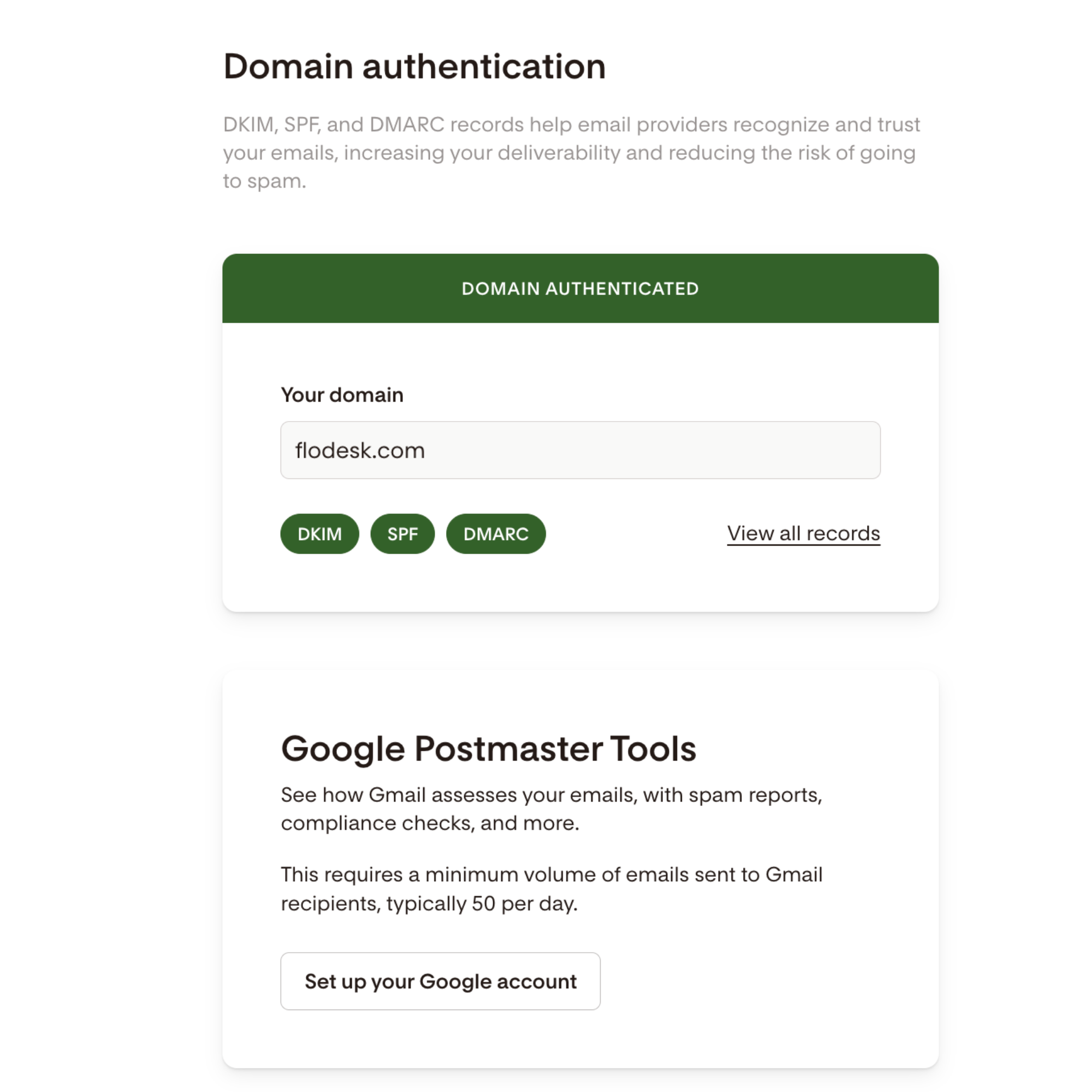
If you're not sure whether your domain is fully set up, you can check your authentication status in Flodesk under My Account > Domain setup. Your domain card should show all green and say "Domain authenticated".
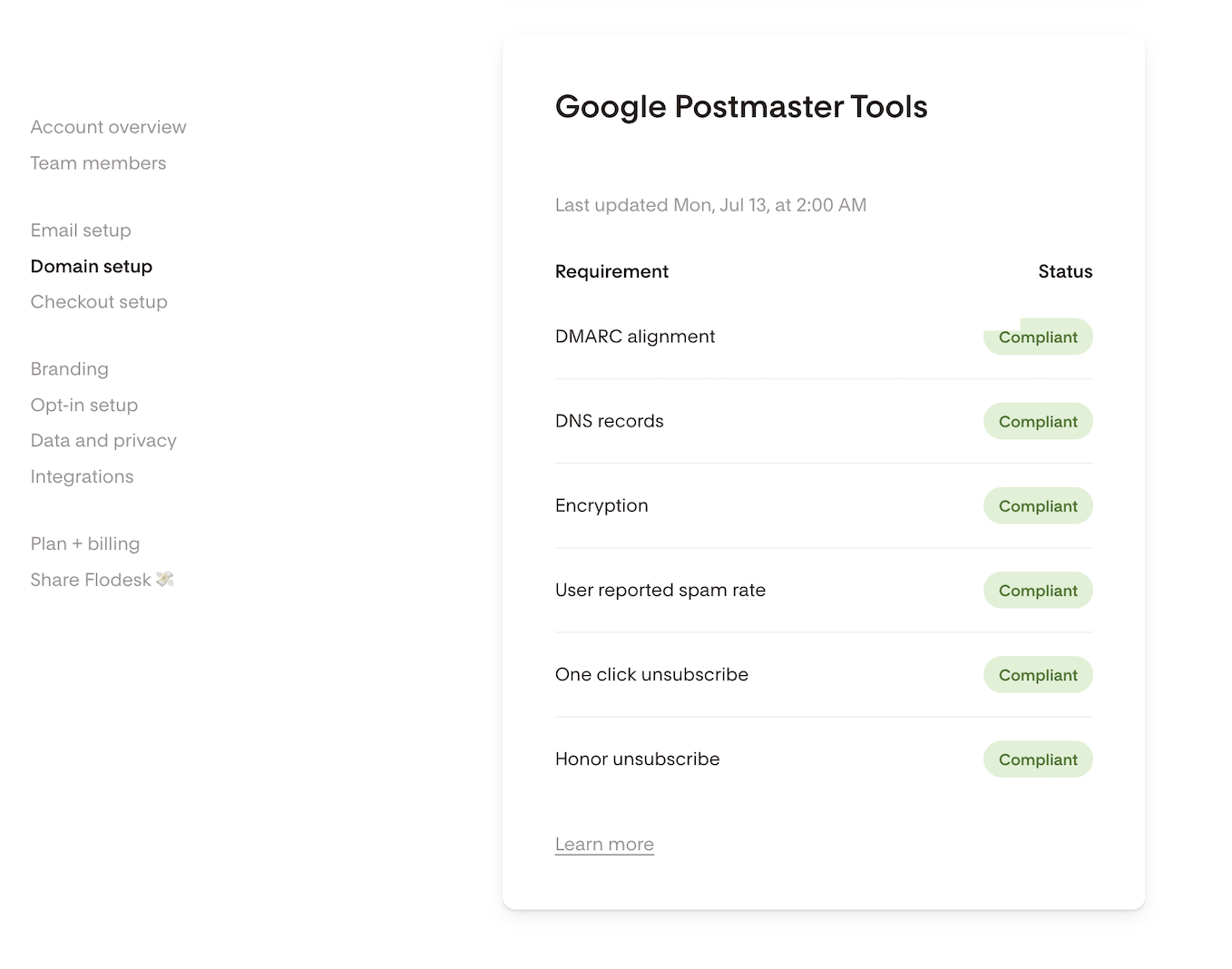
Here, you can also connect to your Google Postmaster Tools account and see how Gmail views your sending domain.
For step-by-step instructions on how to cover the authentication steps, follow the guides below:
FAQ
Why do I need to do any of this? I'm just sending newsletters, not spam.
Inbox providers can't tell the difference between a legitimate newsletter sender and a spammer just by looking at the email content. Authentication records are how you prove you're legitimate. Think of it like showing ID at a venue: it's not because you look suspicious, it's because everyone has to show it. Without authentication, even perfectly good emails can get blocked.
What actually happens if I don't meet these requirements?
Your emails may be permanently bounced or sent straight to spam, rather than reaching your subscribers' inboxes. Unlike older systems that would delay delivery and retry, Gmail and Microsoft now outright reject non-compliant emails with no second chance. Repeated rejections can also damage your sender reputation, which can take weeks or months to recover from.
Do I need a custom domain?
Not to get started, but it's strongly recommended. If you're sending from a free email address (like gmail.com or yahoo.com), Flodesk will temporarily route your emails through its own verified domain to keep things deliverable. But long term, a custom domain is the best way to protect your deliverability, build trust with your subscribers, and stay compliant as inbox requirements continue to tighten.
What is SPF, DKIM, and DMARC in plain terms?
Think of them as three layers of identity verification for your emails. SPF is like a guest list: it tells inbox providers that Flodesk is authorized to send on your behalf. DKIM is like a wax seal: it proves your email hasn't been tampered with in transit. DMARC is like a security policy: it tells inbox providers what to do if someone tries to impersonate you. Together, they make your emails much more trustworthy to inbox providers.
Do I need to set up one-click unsubscribe myself?
No. Flodesk adds the required technical code to every email automatically. This is already handled for you.
I only send a small number of emails. Do these rules still apply to me?
The strictest requirements (needing all three of SPF, DKIM, and DMARC) technically apply to senders of 5,000 or more emails per day. But authentication best practices benefit everyone, regardless of list size. Inbox providers are increasingly treating unauthenticated emails with suspicion across the board, so setting up a custom domain and authenticating it is worth doing even if you're not a bulk sender.
Do these requirements apply to Microsoft email addresses too?
Yes. Microsoft began enforcing similar requirements for Outlook, Hotmail, and Live.com addresses in May 2025. The standards are consistent with Gmail's and Yahoo's. Non-compliant emails to Microsoft addresses are rejected outright, not filtered to junk.
How do I know if I'm already compliant?
Check your domain setup in Flodesk under My Account > Domain setup. You can also use Google's Postmaster Tools to see how Gmail currently views your sending domain. If you connect your Google Postmaster Tools account to Flodesk, you can see everything in one place under Account settings > Domain setup. If you're fully verified in Flodesk with SPF, DKIM, and DMARC in place, you're in good shape.
When did these requirements come into effect? Is this new?
These requirements have been rolling out since early 2024 and are now fully enforced across all major inbox providers:
Gmail started enforcement in February 2024 and tightened it significantly in November 2025. Non-compliant emails are now permanently rejected with no retry, meaning they never reach your subscribers at all.
Yahoo coordinated its rollout with Gmail and enforces essentially the same standards.
Microsoft (Outlook, Hotmail, Live.com) joined in May 2025 with equally strict enforcement. Non-compliant emails are outright rejected, not even filtered to junk.
So if you've been sending emails without a verified custom domain and haven't heard about this yet, now is a good time to get set up. The longer you wait, the greater the risk that your emails are already being blocked without you knowing it.