
Understanding your Deliverability Center
What it is
The Deliverability Center gives you one place to see factors that affect whether your emails reach recipients, including:
your domain authentication,
your compliance with inbox provider rules, and
the health of your audience.
You can access your Deliverability Center in the left navigation. It's available on all Flodesk plans.
Two things before you dig in:
If you're sending from a free email address (like a Gmail or Outlook address) instead of a custom domain, you won't see the SPF, DKIM, or DMARC sections. Those only appear once a custom domain is set as your default sending address.
Your Deliverability Center reflects your default sending address only. If you send from more than one domain, switch your default in Account settings > Email setup to see the Deliverability Center run for a different address.
Domain authentication: Sending address, SPF, DKIM, and DMARC
This is where you confirm inbox providers can trust that your emails really came from you.
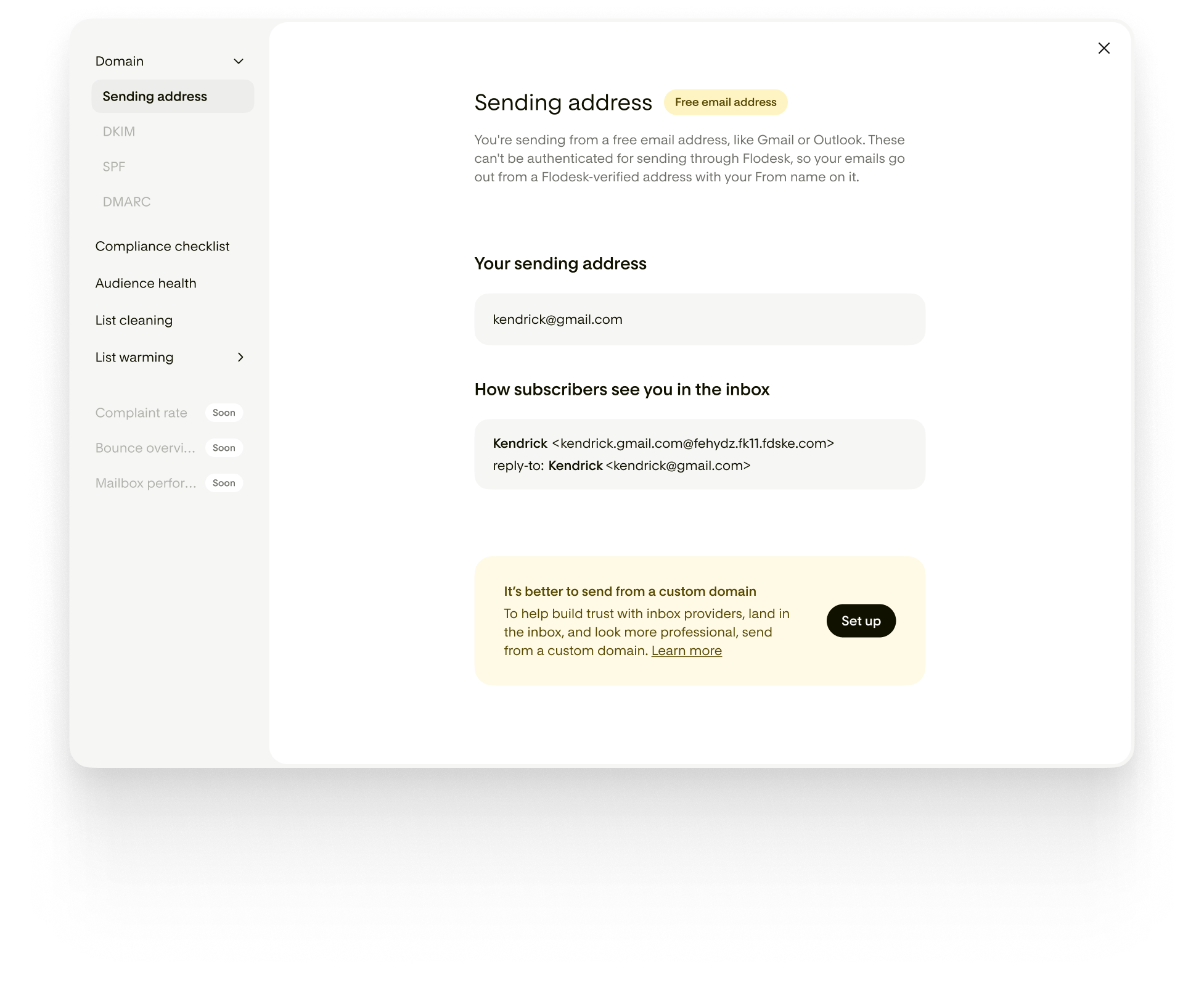
Sending address
Shows the status of your default sending address:
Free email address: you're sending from an address like Gmail or Outlook. You don't own those domains, so you can't authenticate them yourself. Instead, Flodesk sends your emails from an address it has already authenticated, with your name attached.
Unauthenticated: you're using a custom domain, but it isn't authenticated yet. Your emails still send from a Flodesk authenticated address in the meantime.
Authenticated: your domain is authenticated. Your emails send from your own domain, and you're building your own sending reputation with inbox providers.
This section also shows a preview of exactly how your from and reply-to lines will look to a subscriber opening the email in their inbox, so there are no surprises.
See an example below showing a free email address as the sender:
SPF, DKIM, and DMARC
These three technical records tell inbox providers that Flodesk is allowed to send on your behalf, and that your emails haven't been tampered with along the way:
SPF (Sender Policy Framework): confirms which services, like Flodesk, are allowed to send from your domain.
DKIM (DomainKeys Identified Mail): adds a digital signature to every email so inbox providers can confirm it came from you and wasn't changed in transit.
DMARC (Domain-based Message Authentication, Reporting, and Conformance): tells inbox providers what to do with an email if SPF or DKIM don't check out, protecting your reputation.
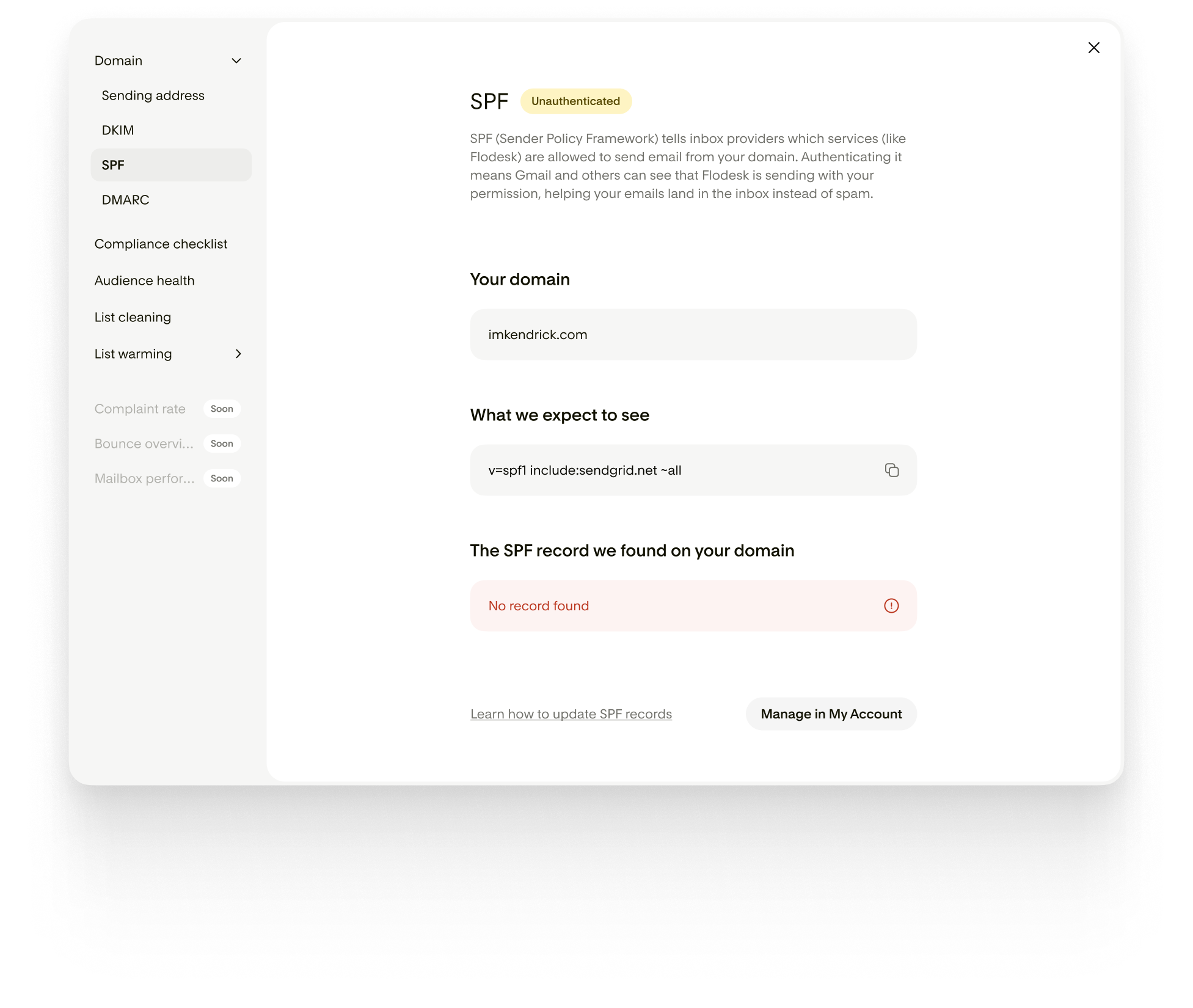
For each one, your Deliverability Center shows:
The domain you're sending from
The record Flodesk expects to see
The record it actually found on your domain (with a copy button)
A status of Authenticated or Unauthenticated (unauthenticated covers missing, incorrect, or still-pending records)
If something doesn't match, you'll see a short explanation of what's wrong. From there, you'll need to update the record yourself with your domain host. The Deliverability Center shows you what's wrong, it doesn't fix DNS records automatically.
See an example below showing an unauthenticated SPF record:
Compliance checklist
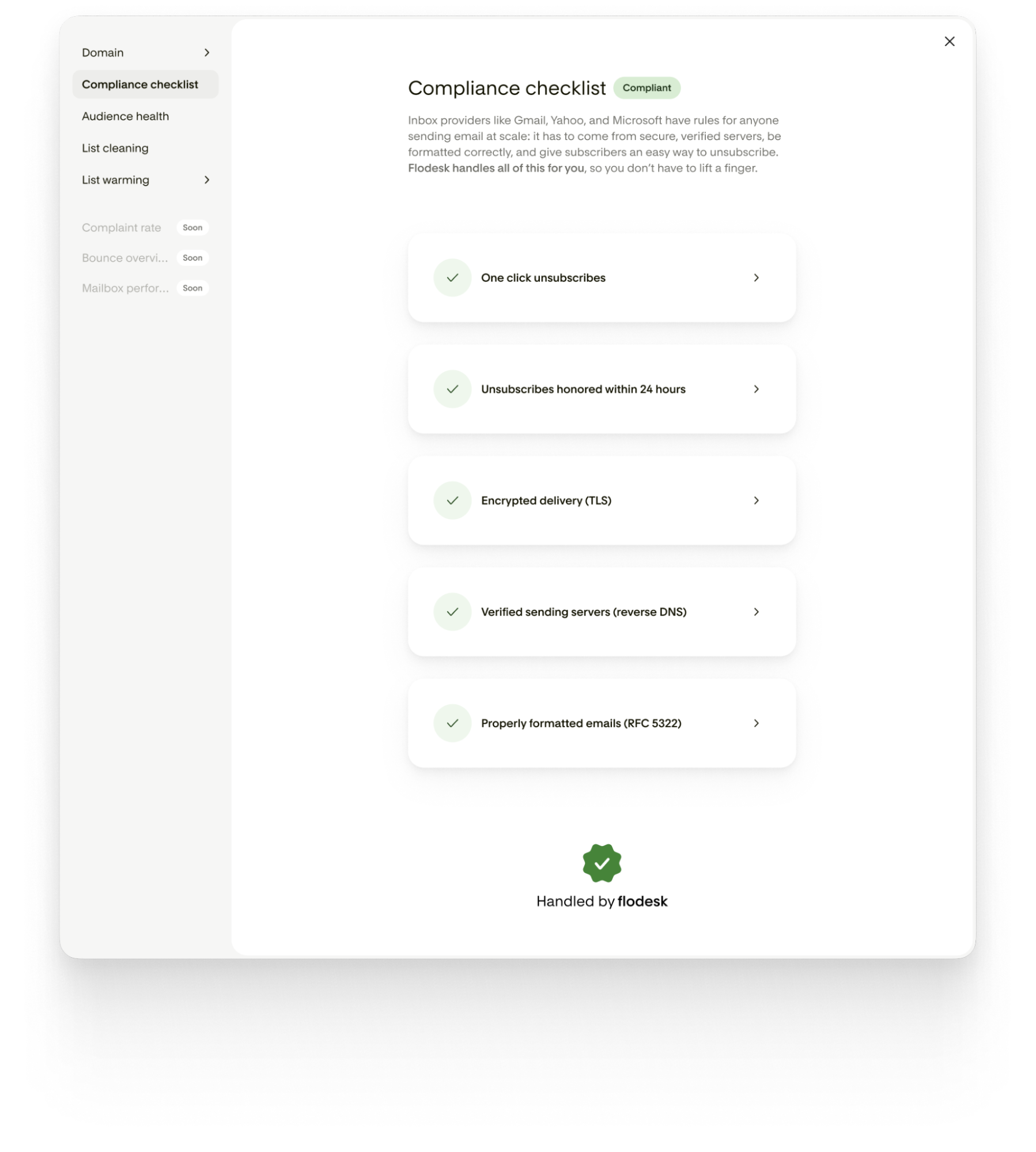
This section covers the technical requirements inbox providers like Gmail, Yahoo, and Microsoft set for anyone sending email at scale. Flodesk handles all of it on your end, so there's nothing for you to set up.
One-click unsubscribe: Subscribers can leave your list with a single click, no login or extra steps.
Unsubscribes honored within 24 hours: When someone unsubscribes, they're removed from your list within 24 hours.
Encrypted delivery (TLS): every email travels over an encrypted connection so it can't be read or changed in transit.
Verified sending servers (reverse DNS): Flodesk's servers have matching forward and reverse DNS records, so inbox providers can confirm where your email really came from.
Properly formatted emails (RFC 5322): every email follows the technical standard for formatting, so inbox providers don't filter or reject it on a technicality.
Audience health
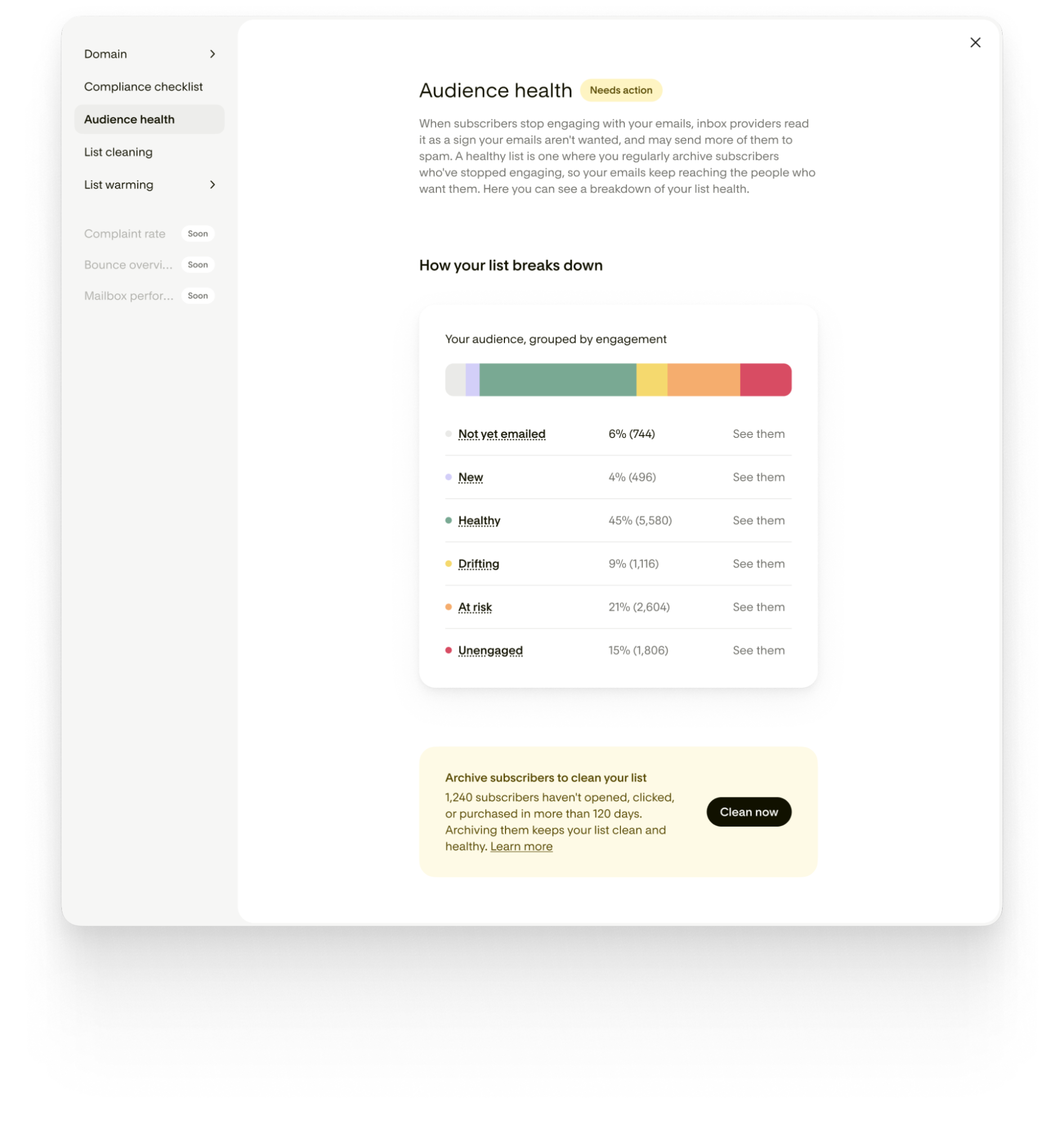
When subscribers stop opening your emails, inbox providers read that as a sign your emails aren't wanted, and they may send more of your mail to spam. This section shows how engaged your audience is right now.
Every subscriber in an “active” status falls into one of six groups:
Not yet emailed: joined more than 30 days ago and hasn't received an email or engaged yet
New: joined or resubscribed in the last 30 days, hasn't opened, clicked, or purchased yet
Healthy: opened, clicked, or purchased within the last 90 days
Drifting: hasn't engaged in more than 90 days (but fewer than 120)
At risk: hasn't engaged in 120 days or more, and doesn’t yet meet the unengaged criteria
Unengaged: on your list for 180+ days, received six or more emails, and did not open, click, or purchase
You'll see a bar showing the breakdown, plus a count for each group. Tap any group to see those exact subscribers in Audience, filters already applied.
The overall status reads:
Healthy: none of your active subscribers are Drifting, At risk, or Unengaged
Needs action: Unengaged subscribers make up 15% or more of your active list
When your Unengaged and At risk groups add up to a meaningful number, you'll see a prompt to clean your list right from this section.
List cleaning
Every email sent to someone who doesn't open it signals to inbox providers that your emails aren't wanted, and that affects where your emails land for all of your subscribers. Archiving subscribers who've gone quiet protects deliverability for the ones who are still paying attention.
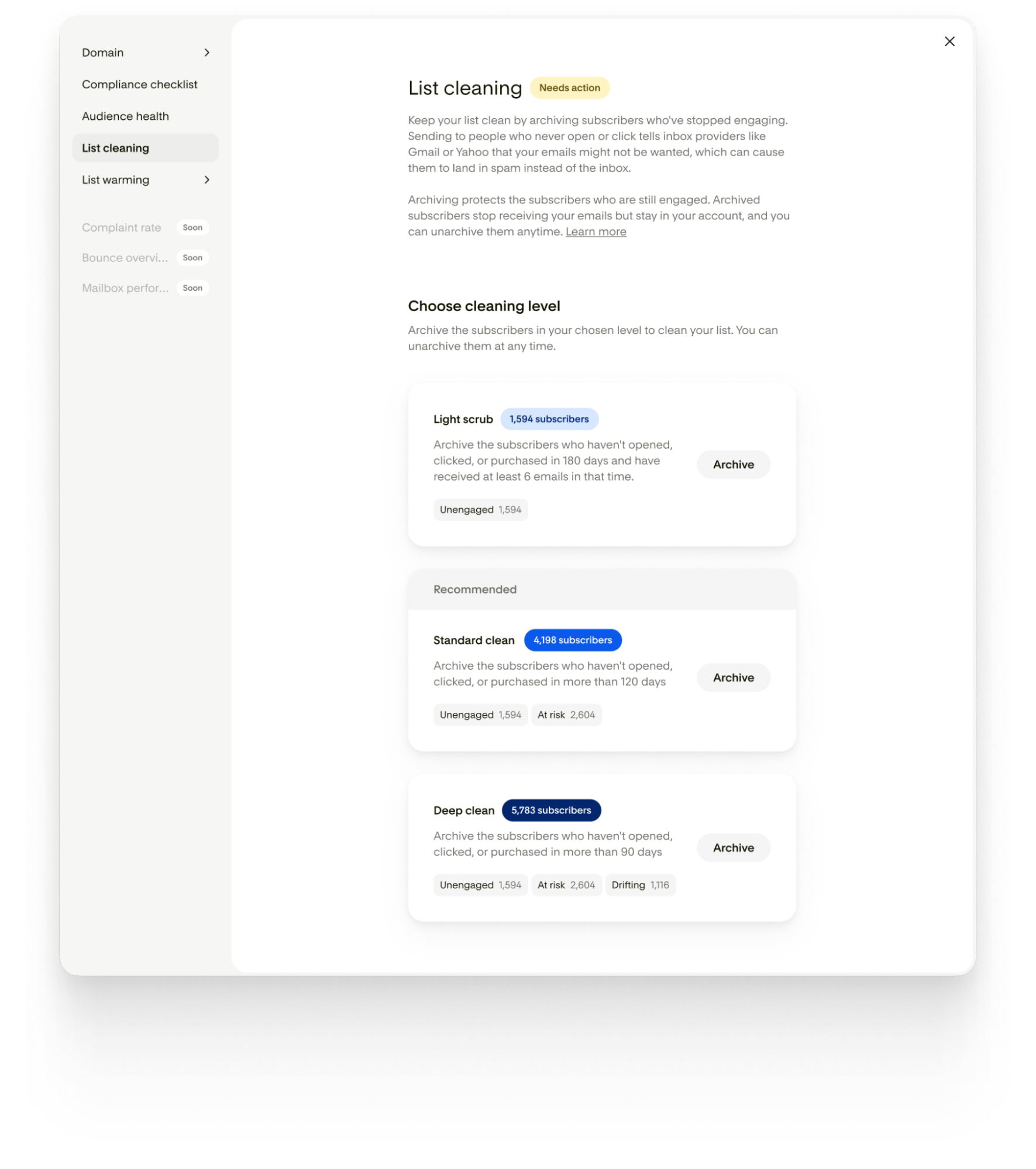
Three cleaning levels, each showing exactly how many subscribers it would archive before you commit:
Light scrub: archives Unengaged subscribers (no opens, clicks, or purchases in 180+ days, after receiving at least six emails).
Standard clean (recommended): archives Unengaged and At risk subscribers (no engagement in 120+ days).
Deep clean: archives Unengaged, At risk, and Drifting subscribers (no engagement in 90+ days).
Each level includes everything in the level above it. Archived subscribers stop receiving your emails, but they stay in your account, and you can unarchive them at any time. You'll get a confirmation email once the archive finishes.
List warming
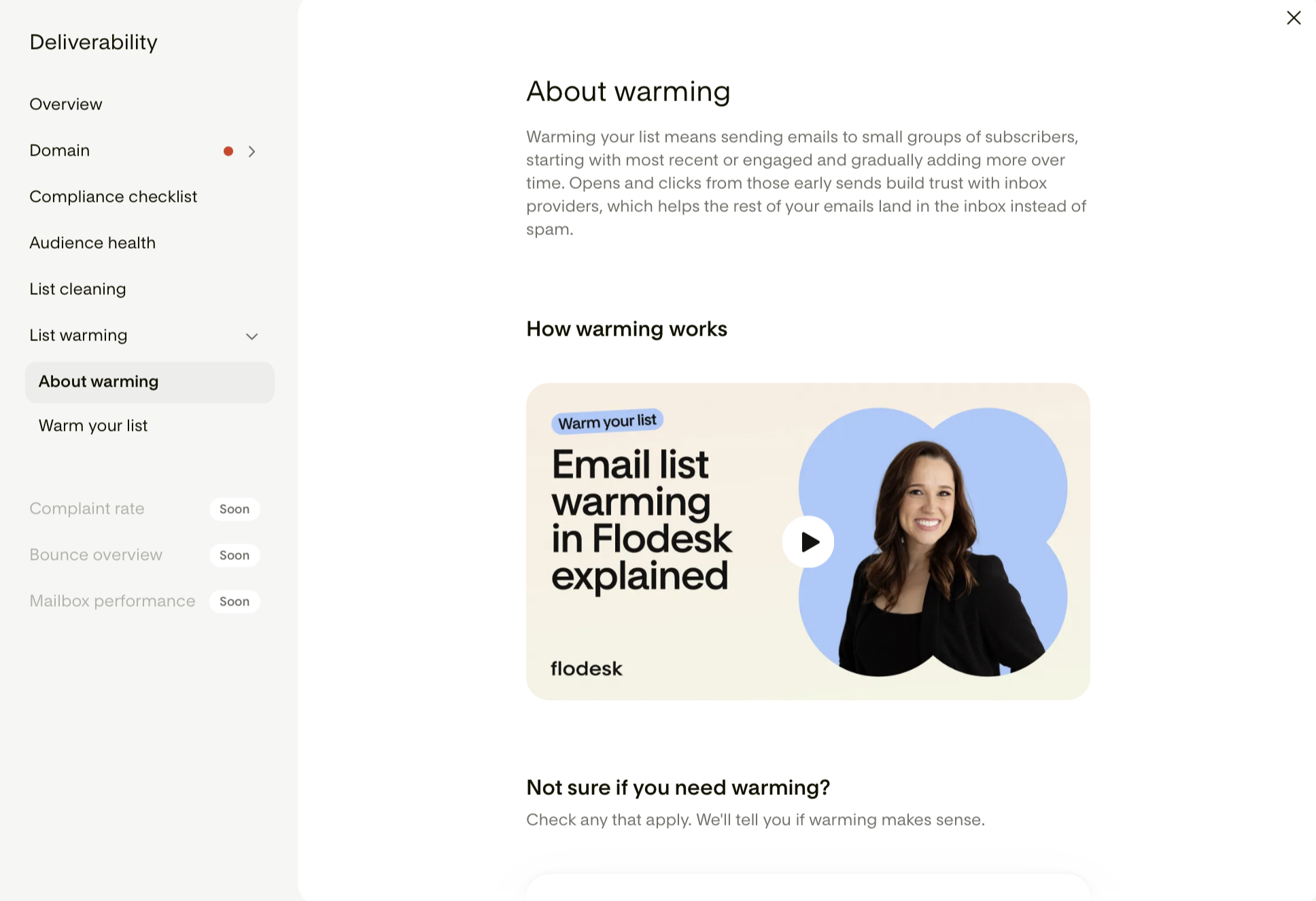
Warming means starting with your most engaged subscribers and gradually building up to your full list. Early opens and clicks tell inbox providers your email is wanted, which helps everything you send afterward land in the inbox instead of spam.
About warming
Not sure if you need it? Check any of these that apply to you:
You moved to Flodesk, added a custom domain, or changed your sending setup
It's been eight weeks or longer since your last email
Your open or click rates have been dropping
More subscribers have been marking your emails as spam
Your emails are getting delivered but landing in spam
Your emails are bouncing back from an inbox provider
Check even one, and warming is worth doing.
You may also see an automatic prompt to warm your list if your sending setup is brand new (a newly verified domain, a changed default sending domain, or a new Flodesk account with fewer than three campaigns sent) or if it's been eight weeks or more since your last campaign.
Warm your list
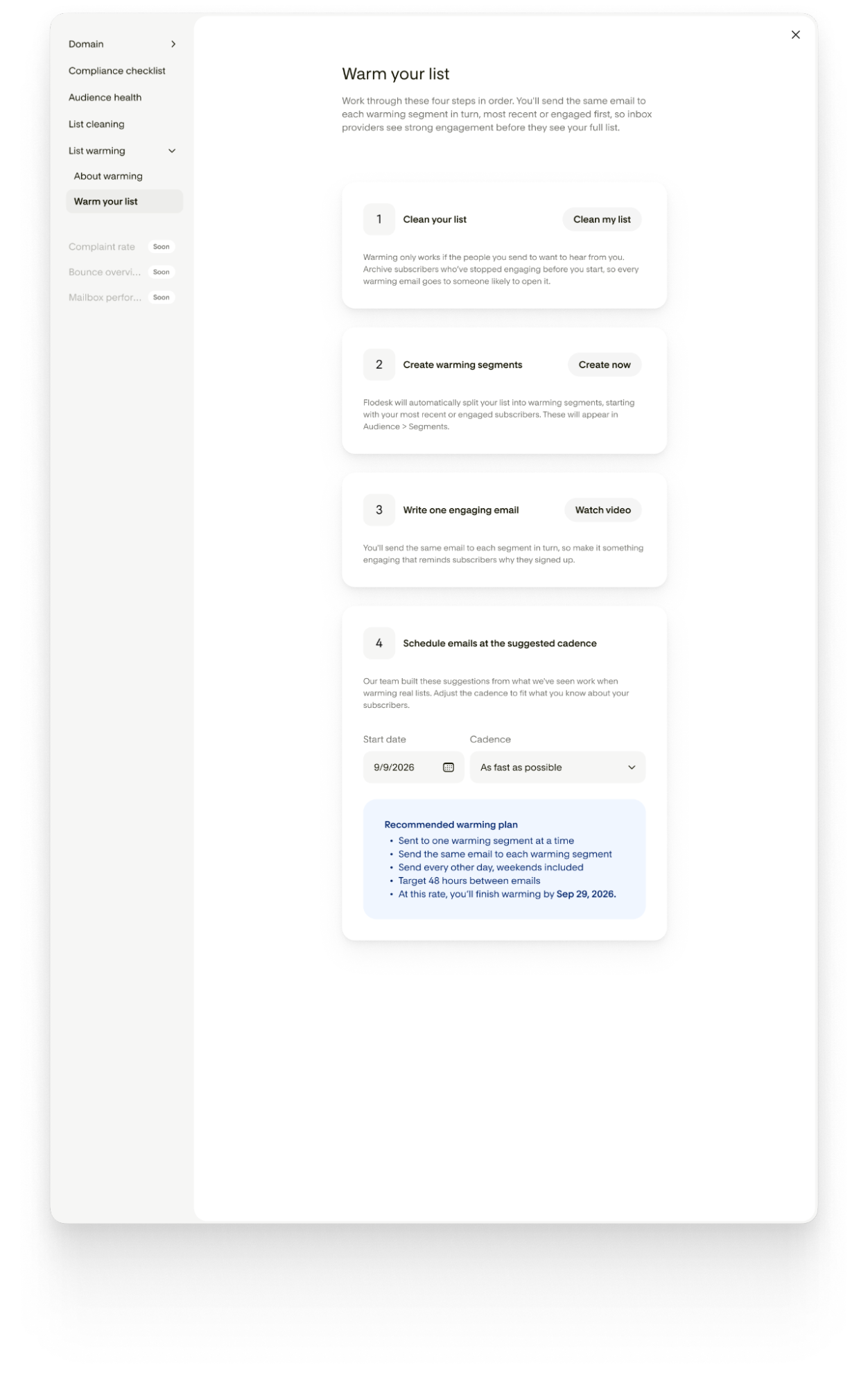
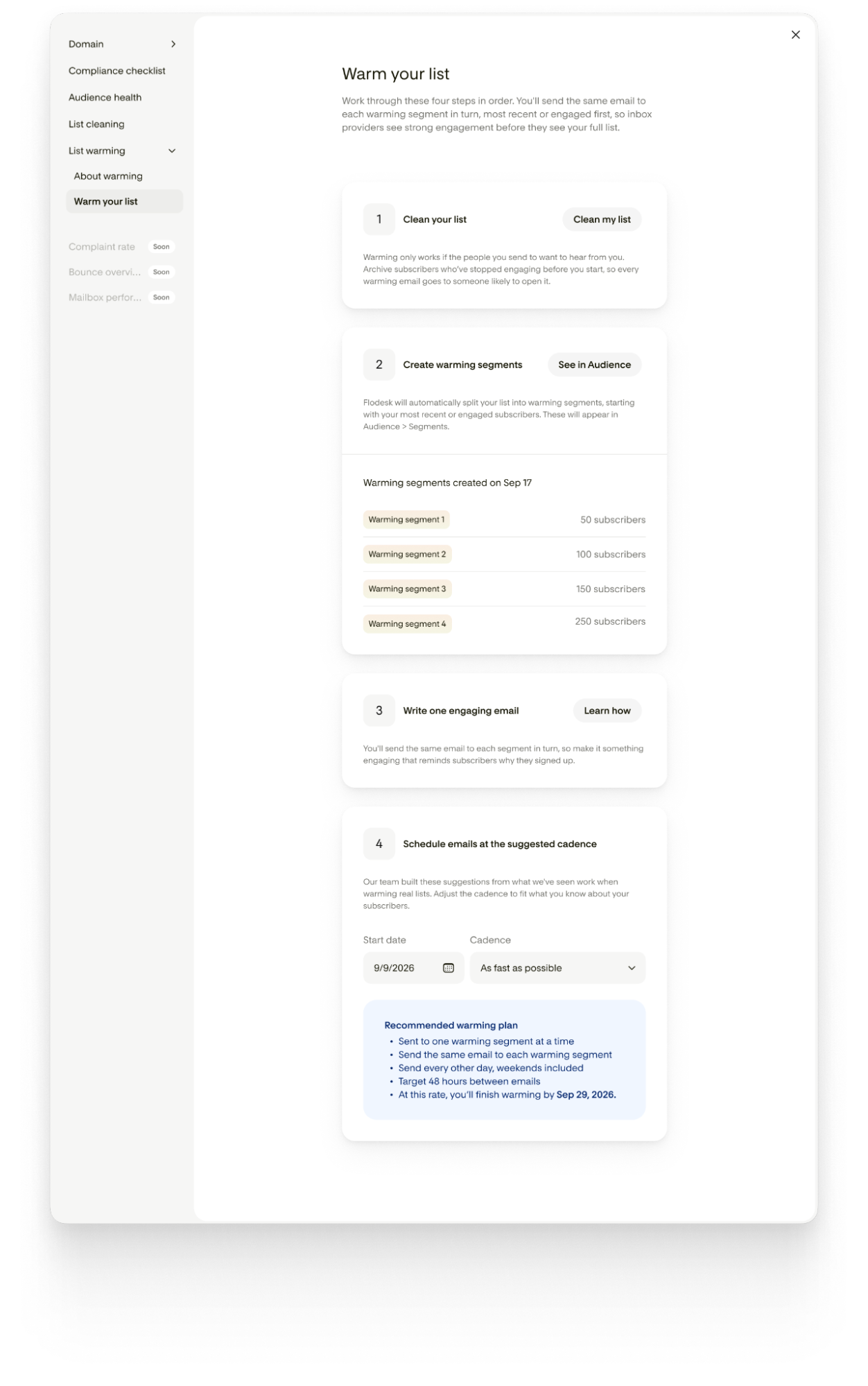
In this section, you’ll see a four-step checklist walking you through it. You can move through these in order at your own pace:
Clean your list. Warming works best when you're only sending to subscribers who actually want to hear from you. Archive dormant subscribers first (this links straight to List cleaning).
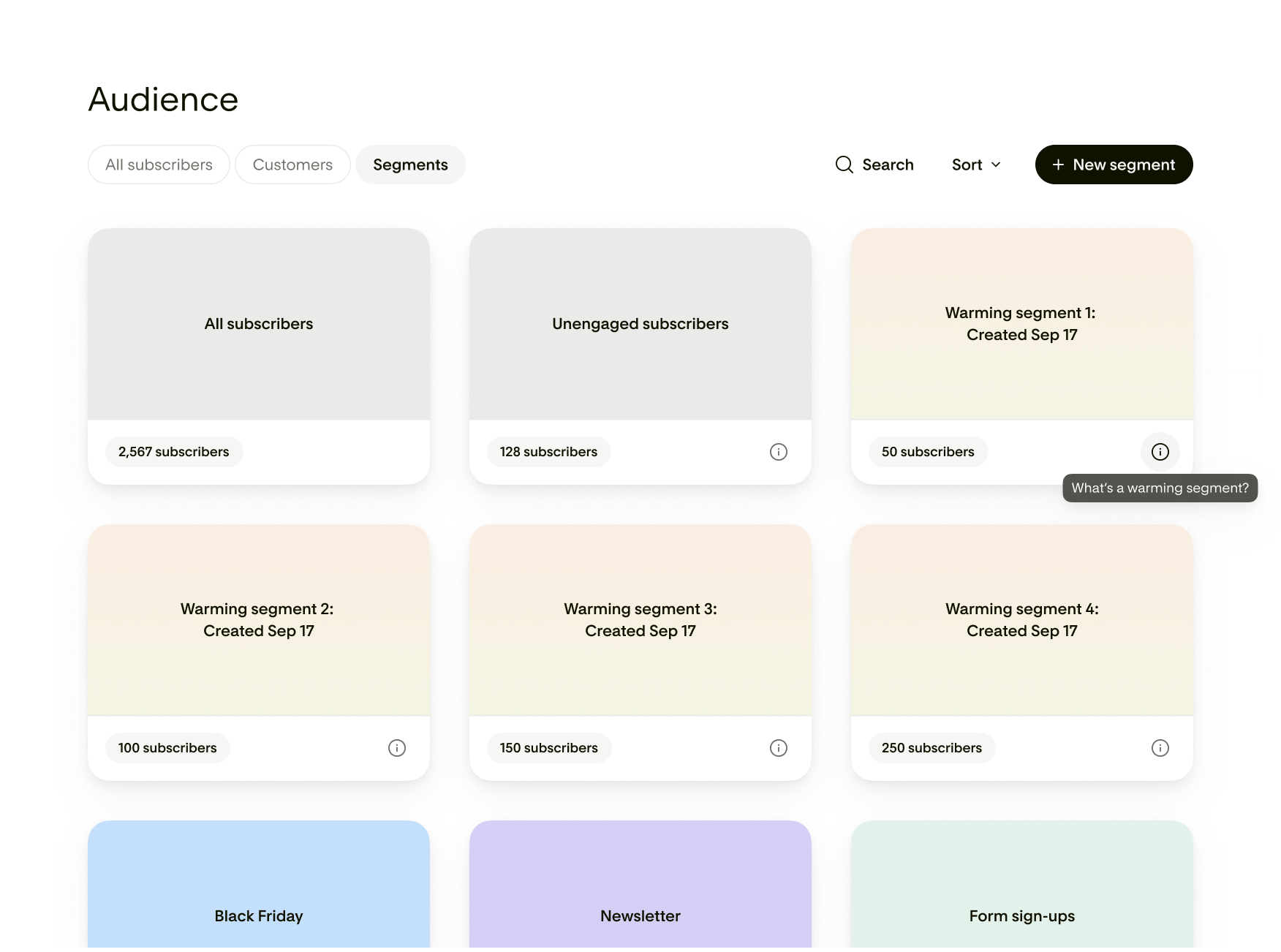
Create warming segments. Flodesk automatically splits your list into segments, starting with your most engaged subscribers and starting at 50 subscribers before increasing. These appear in Audience under Segments and behave like any other segment (you can edit or delete them).
Write one engaging email. You'll send the same email to each segment in turn, so make it something that reminds subscribers why they signed up.
Pick your cadence. Choose from "As fast as possible" (the default, sending every other day), "Once a week," or "Every two weeks." Whichever you pick, you'll see an estimated date for when you'll finish warming your full list.
Flodesk builds the segments and the schedule; you write and send the emails yourself. This is a guided process, not an automated one.
FAQ
Does the Deliverability Center fix problems for me automatically?
For SPF, DKIM, and DMARC, your Deliverability Center shows you what's expected and what it found on your domain, but you'll need to update the record yourself with whoever hosts your domain (like GoDaddy or Namecheap). List cleaning and warming segments are created for you with one click once you choose to run them.
Why don't I see SPF, DKIM, and DMARC in my Deliverability Center?
Those sections only appear when a custom domain is set as your default sending address. If you're sending from a free email address like Gmail, you won't see them.
I have more than one sending domain. Will the Center check all of them?
No, it reflects your default sending address only. To check a different domain, switch your default sending address in Account settings > Email setup.
What happens to subscribers I archive during list cleaning?
They stop receiving your emails but stay in your account. You can unarchive them at any time.
Does everyone on my team get to make changes here?
If you have invited others to collaborate in your Flodesk account via Team seats, Admins and Managers can authenticate domains and trigger actions like "Clean now," archiving, and creating warming segments. Editors can view every section but can't take those specific actions.
Is this a complete deliverability health check?
No. This dashboard covers domain authentication, compliance basics, and audience engagement, the most common and most fixable causes of deliverability issues. Bounce codes, complaint rates, and inbox-provider-level placement are coming soon.