
Understanding and managing unconfirmed subscribers
Overview
If you notice some subscribers showing a status of "Unconfirmed" in your Audience, there are a few reasons this can happen. The most common is double opt-in: someone filled out your sign-up form but didn't click the confirmation link. But contacts can also appear as Unconfirmed when they're added to Flodesk through a post-purchase follow-up workflow or an abandoned cart workflow without having given marketing consent.
This article explains each scenario, how to find those subscribers, and what your options are for handling them.
What is an unconfirmed subscriber?
A contact shows as Unconfirmed in Flodesk when they've been added to your Audience but haven't confirmed their consent to receive marketing emails. There are three ways this can happen:
1. Double opt-in: confirmation email not clicked
When double opt-in is enabled on your sign-up forms, new subscribers go through a two-step process:
They submit your form
They receive a confirmation email and click the link to confirm
If they complete step one but never click the confirmation link, their status will be Unconfirmed. They've expressed interest, but haven't fully opted in yet.
Learn how to set up double opt-in for your forms.
2. Post-purchase follow-up workflow: no marketing consent given
When someone completes a purchase and is added to Flodesk through a post-purchase follow-up workflow, but didn't check the marketing opt-in box at checkout, they'll be added as Unconfirmed. Because they haven't given marketing consent, they won't receive standard marketing emails until their status becomes Active. Note that post-purchase follow-up events suppress the double opt-in email, so a confirmation email won't be sent automatically in this case.
3. Abandoned cart workflow: no purchase or marketing consent
When someone starts checkout but doesn't complete their purchase, they may be added to Flodesk through an abandoned cart workflow as Unconfirmed. Note that abandoned cart events suppress the double opt-in email, so a confirmation email won't be sent automatically in this case.
The table below summarizes how each scenario maps to a subscriber status:
Scenario | Flodesk status |
|---|---|
Double opt-in form submitted, confirmation link not clicked | Unconfirmed |
Purchase completed, no marketing opt-in at checkout | Unconfirmed (no automatic double opt-in sent) |
Cart abandoned, no purchase completed | Unconfirmed (no automatic double opt-in sent) |
Purchase completed with marketing opt-in | Active |
How to find your unconfirmed subscribers
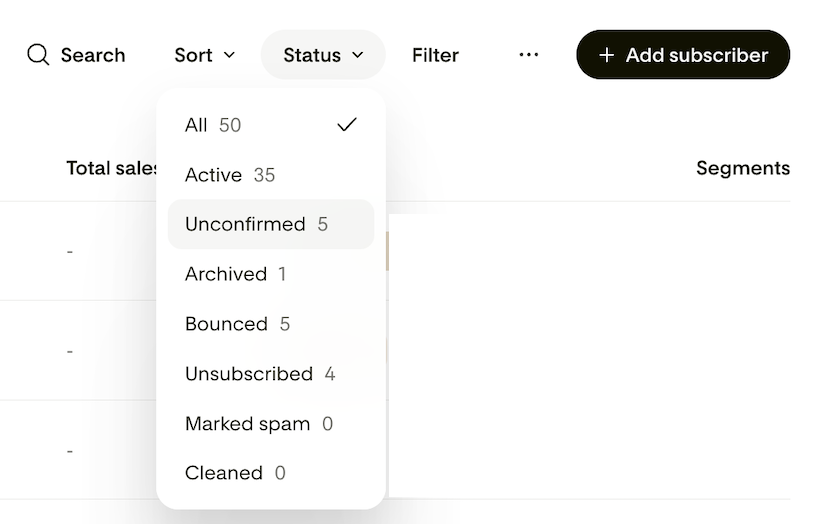
Go to Audience > All subscribers
Under Status, select Unconfirmed
Your list will now show only subscribers with an unconfirmed status.
What to do about unconfirmed subscribers
You have two options for handling unconfirmed subscribers.
Option 1: Resend the opt-in email
If you think subscribers may have missed or overlooked the confirmation email, you can send it to them again:
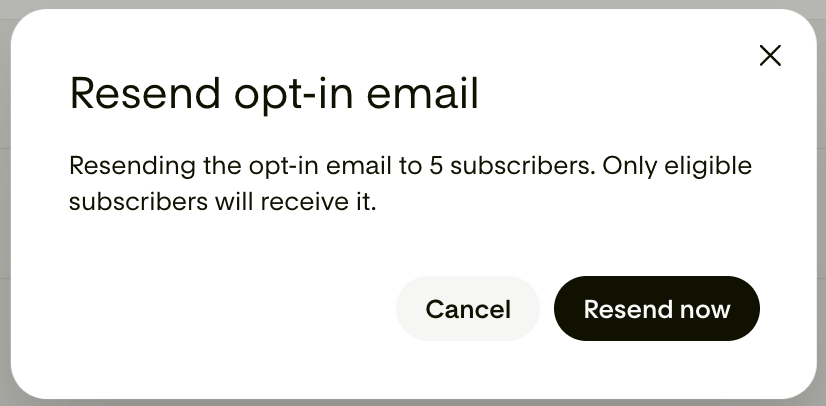
Select all unconfirmed subscribers (or choose specific ones)
From the bulk actions menu, select Resend opt-in
They'll receive a confirmation email
Once they click the confirmation link, their status will change to Active

Option 2: Delete unconfirmed subscribers
If subscribers have been unconfirmed for a while and are unlikely to confirm, you may want to remove them to keep your Audience clean.
One important thing to know before deleting: if a subscriber is deleted and later clicks the confirmation link from their original opt-in email, they won't be added back to your list automatically. They would need to sign up again through one of your Flodesk forms.
FAQ
What does "unconfirmed" mean in Flodesk?
An unconfirmed subscriber is a contact who has been added to your Audience but hasn't confirmed their consent to receive marketing emails. This can happen when someone fills out a double opt-in form but doesn't click the confirmation link, when a buyer completes a purchase without opting in to marketing, or when someone abandons a cart and is added via an abandoned cart workflow.
Why do I have unconfirmed subscribers?
There are a few reasons. If you use double opt-in on your forms, contacts become unconfirmed when they submit the form but don't click the confirmation link. Contacts can also appear as unconfirmed if they were added through a post-purchase follow-up workflow or an abandoned cart workflow without giving marketing consent at checkout.
Do unconfirmed subscribers receive my regular emails?
No. Only subscribers with an Active status receive your marketing emails. Unconfirmed subscribers won't be included in your sends until they confirm their consent.
How do I find unconfirmed subscribers in Flodesk?
Go to your Audience tab, select Unconfirmed under Status. This will show you all contacts with an unconfirmed status.
Can I send/resend the confirmation email to unconfirmed subscribers?
Yes. Filter your Audience by Unconfirmed status, select the subscribers you want to follow up with, and choose Resend opt-in from the bulk actions menu. Once they click the link, their status will update to Active.
Why are my post-purchase or abandoned cart contacts showing as unconfirmed?
Contacts added through post-purchase follow-up workflows or abandoned cart workflows are added as Unconfirmed if they didn't opt in to marketing at checkout. This is expected behavior.
Should I delete unconfirmed subscribers?
That's up to you. If subscribers have been unconfirmed for a long time and resending the opt-in email hasn't worked, removing them can help keep your Audience tidy. Just keep in mind that if you delete someone and they later click the confirmation link from their original email, they won't be re-added automatically. They'd need to sign up again.
If I delete an unconfirmed subscriber and they click the old confirmation link, will they be added back?
No. Deleting a subscriber removes them from your Audience entirely. If they click the old confirmation link after being deleted, nothing will happen. They would need to sign up again through one of your Flodesk forms to be added back.
What is double opt-in and do I have to use it?
Double opt-in is an optional verification step that requires new subscribers to confirm their email address before being added to your list. It's a good way to ensure the people on your list genuinely want to hear from you. You can enable or disable it on a per-form basis in Flodesk.