
How to find which workflow emails have the highest unsubscribe rate
Overview
If subscribers are unsubscribing during a workflow, knowing exactly which email triggered that decision helps you fix the right thing. The Workflow email performance table in Flodesk lets you sort by unsubscribe rate so you can quickly spot where drop-off is happening and why.
How to find your highest unsubscribe rates by workflow email
Log in to Flodesk and go to Analytics > Workflows
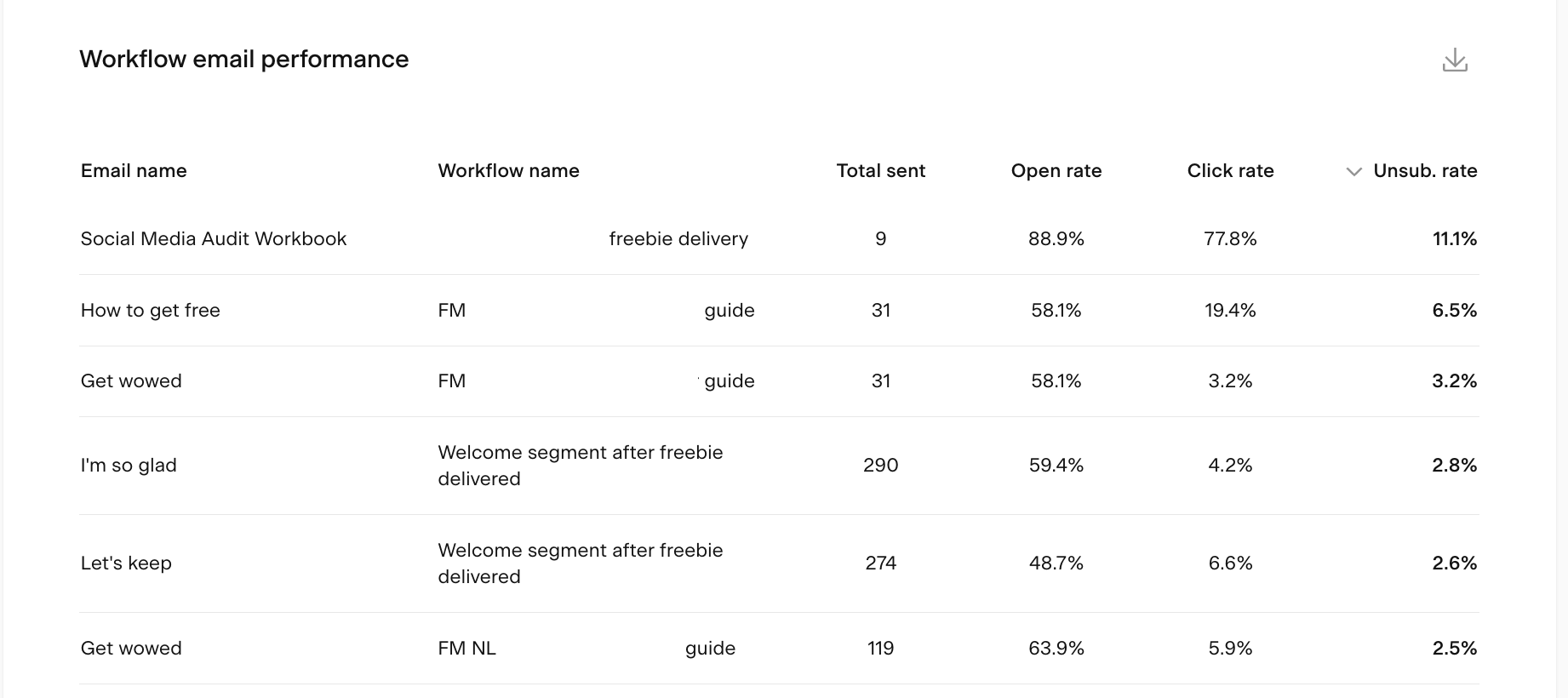
Scroll down to the Workflow email performance table
Click the Unsub. rate column heading to sort the table by unsubscribe rate, from highest to lowest
The unsubscribe rate shows the percentage of unique unsubscribes compared to the total number of subscribers who received that email. A higher rate means a larger proportion of recipients chose to unsubscribe after receiving it.
How to use the data
Once you've identified the workflow emails with the highest unsubscribe rates, here are some ways to investigate and improve them:
Review the content: does the email deliver what the subscriber signed up for? An unexpected topic or a hard sell when subscribers expected value can cause drop-off
Check the timing: is the email arriving too soon after a previous one, or at a point in the sequence where engagement tends to drop naturally?
Compare against your best performers: look at your workflow emails with the lowest unsubscribe rates and consider what makes those different in terms of subject line, tone, content length, or call to action
Consider the sequence as a whole: sometimes a high unsubscribe rate on one email is a sign that an earlier email set the wrong expectation, not that the email itself is the problem
FAQ
How do I find which workflow emails have the highest unsubscribe rates in Flodesk?
Go to Analytics > Workflows and scroll down to the Workflow email performance table. Click the Unsub. rate column heading to sort the table by unsubscribe rate. The emails with the highest rates will appear at the top.
What does unsubscribe rate mean for a workflow email?
Unsubscribe rate is the percentage of subscribers who unsubscribed after receiving that specific email, compared to the total number of people who received it. For example, if 200 people received an email and 10 unsubscribed, the unsubscribe rate is 5%.
What's considered a high unsubscribe rate for a workflow email?
There's no universal benchmark, but comparing your workflow emails against each other is a practical starting point. If one email has a noticeably higher unsubscribe rate than the others in the same workflow, that's a signal worth investigating.
Why might a workflow email have a high unsubscribe rate?
Common reasons include content that doesn't match what subscribers expected when they signed up, emails arriving too frequently or at the wrong point in the sequence, subject lines that feel misleading, or a hard sell when subscribers were expecting helpful content. Reviewing the email's content and timing alongside your lower-unsubscribe-rate emails can help pinpoint the issue.
Can I see which specific workflow has the most unsubscribes overall, not just by email?
The Workflow email performance table shows data at the individual email level, which you can sort by unsubscribe rate. To get a sense of which workflow is causing the most drop-off overall, look at the unsubscribe rates across all emails within each workflow and consider the cumulative picture.