
How to find your best-performing email content in Flodesk
Overview
The Performance by email table in Flodesk lets you sort your sent emails by click rate, so you can see which content is resonating most with your subscribers. Over time, patterns will emerge across your subject lines, designs, and calls to action that you can use to shape future emails.
How to find your highest-performing emails by click rate
Log in to Flodesk and go to Analytics > Emails
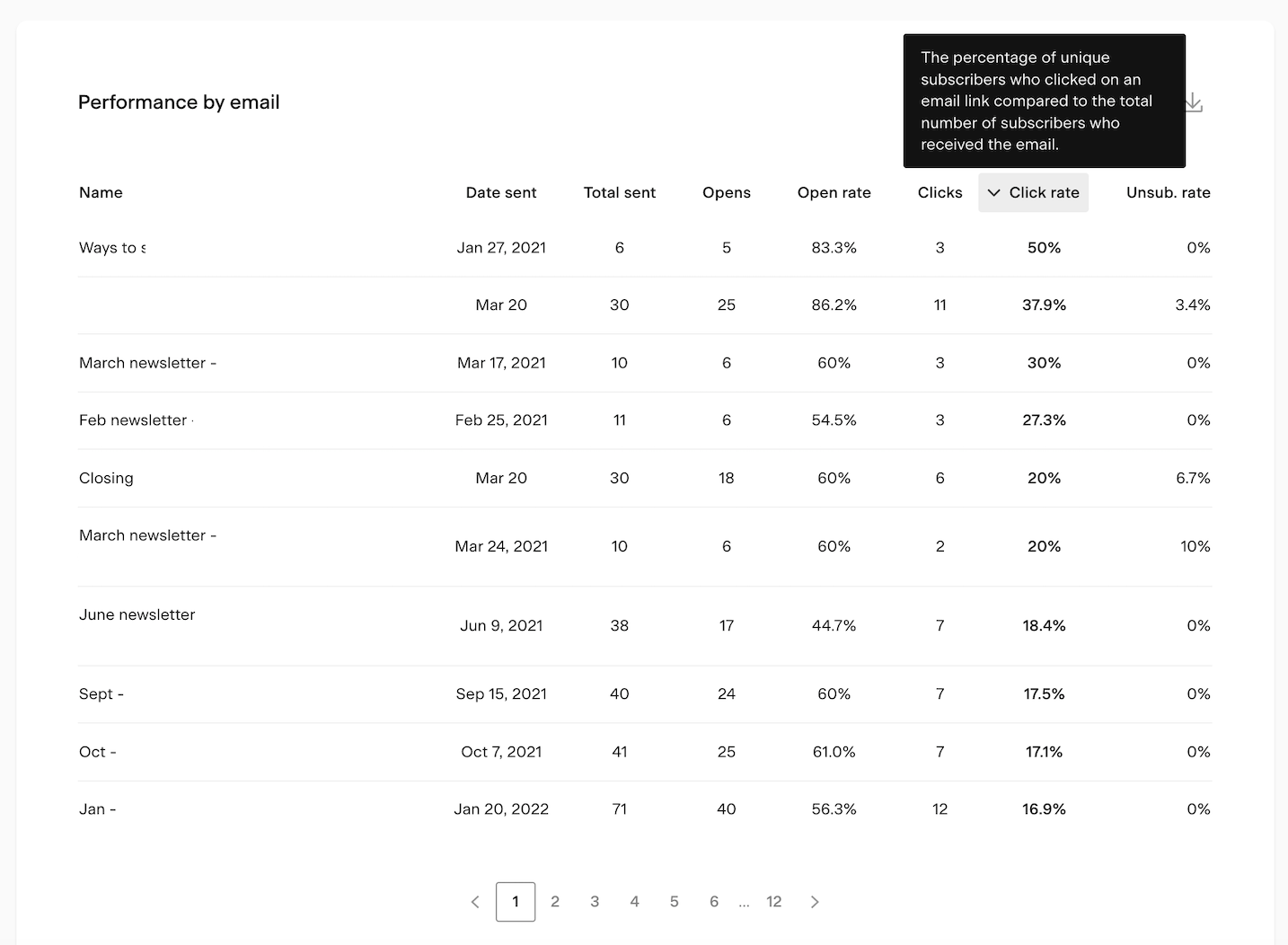
Scroll down to the Performance by email table
Click the Click rate column heading to sort the table from highest to lowest
The emails at the top are the ones your subscribers engaged with most, measured by how many people clicked a link inside them.
You can also sort by Open rate to see which subject lines performed best, giving you a two-sided view of what's working: what gets people to open, and what gets them to click once they're in.
How to use the data
Once you've identified your highest click rate emails, review them one by one and look for patterns:
Email design: do your top performers share a layout, color scheme, or visual style?
Content type: are your subscribers clicking more on educational content, product promotions, personal stories, or something else?
Call to action placement and wording: where is the link or button positioned, and how is it phrased? CTAs that are clear, specific, and placed prominently tend to perform better
Subject lines: cross-reference your top click rate emails with their open rates to see if high engagement carries through from the subject line to the content
Use what you find to inform your next email and test whether applying those patterns makes a difference.
FAQ
How do I find out which emails my subscribers engage with most?
Go to Analytics > Emails and scroll down to the Performance by email table. Click the Click rate column heading to sort the table from highest to lowest. The emails at the top are the ones that drove the most clicks.
What is click rate and why does it matter?
Click rate is the percentage of subscribers who clicked a link inside your email. It tells you how engaging your email content is once someone opens it. A higher click rate means your content and calls to action are compelling enough to get people to take action.
What's the difference between open rate and click rate?
Open rate measures how many people opened your email, which is mostly influenced by your subject line and send time. Click rate measures how many people clicked a link inside the email, which is influenced by your content, design, and calls to action. Sorting by both gives you a fuller picture of what's working.
What should I look for when reviewing my top-performing emails?
Look for patterns in email design, content type, call to action placement and wording, and subject lines. If your top performers share common elements, those are worth repeating. If your lowest performers are consistently missing those elements, that's where to focus your improvements.
How often should I check the Performance by email table?
Checking it regularly, such as after each email send or once a month, helps you build up a picture of what's working over time. The more data you have, the more reliable the patterns you'll spot.