
What is the difference between Preferences on Forms and the Preferences Page?
Learn how these two features work together to personalize what your subscribers receive—both at sign-up and long after.
If you’ve ever wondered:
“Should I add preferences to my form?”
“What does the Manage Preferences link do?”
“Are these connected?”
You’re in the right place. Let’s break it down in simple terms.
Quick overview
Preferences on Forms let subscribers choose what they’re interested in (or how often they want emails) when they first sign up.
The Preferences Page lets subscribers update those choices later by clicking “Manage preferences” in your email footer.
They serve different moments in the subscriber journey—and they are not automatically connected to each other.
What are Preferences on Forms?
Preferences on Forms are options you add directly to an opt-in form.
You can use them to ask subscribers things like:
What topics are you interested in?
What type of content do you want?
How often do you want to hear from us?
This happens at the moment someone subscribes.
Example
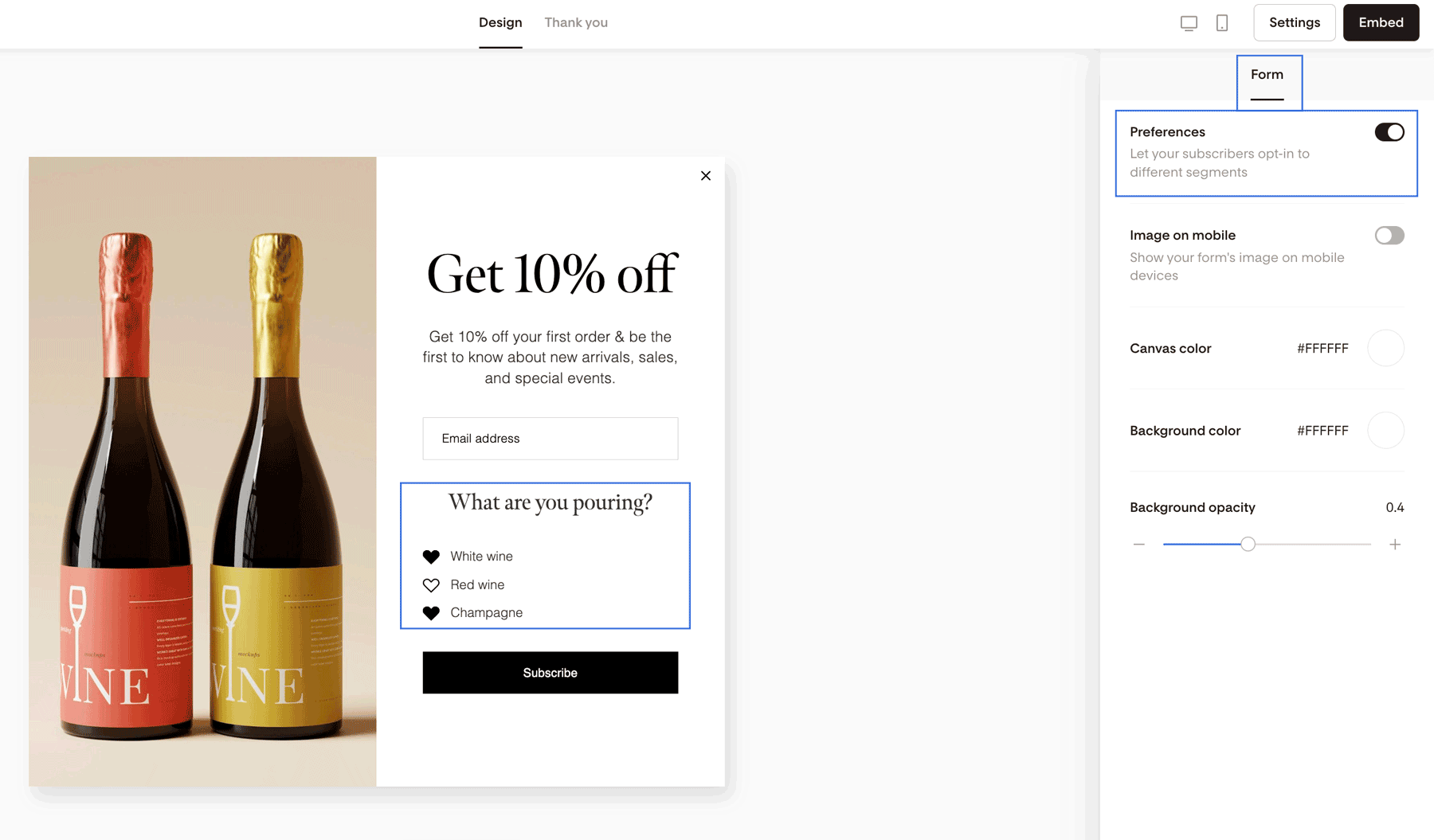
Let’s say you run a wine shop. On your form, you might ask:
White wine
Red wine
Champagne
When someone selects “Red wine,” you can automatically add them to a Red Wine segment. From there, you can send highly targeted content just for red wine lovers.
Preferences on Forms help you personalize from day one.
What is the Preferences Page?
The Preferences Page is where subscribers can update their choices later.
When someone clicks the “Manage preferences” link in the footer of your email, they’re taken to this page.
Here, they can:
Opt into new topics
Opt out of certain types of content
Adjust how often they hear from you
Stay subscribed without fully unsubscribing
This is helpful if their interests change over time.
Example
Using the wine shop again:
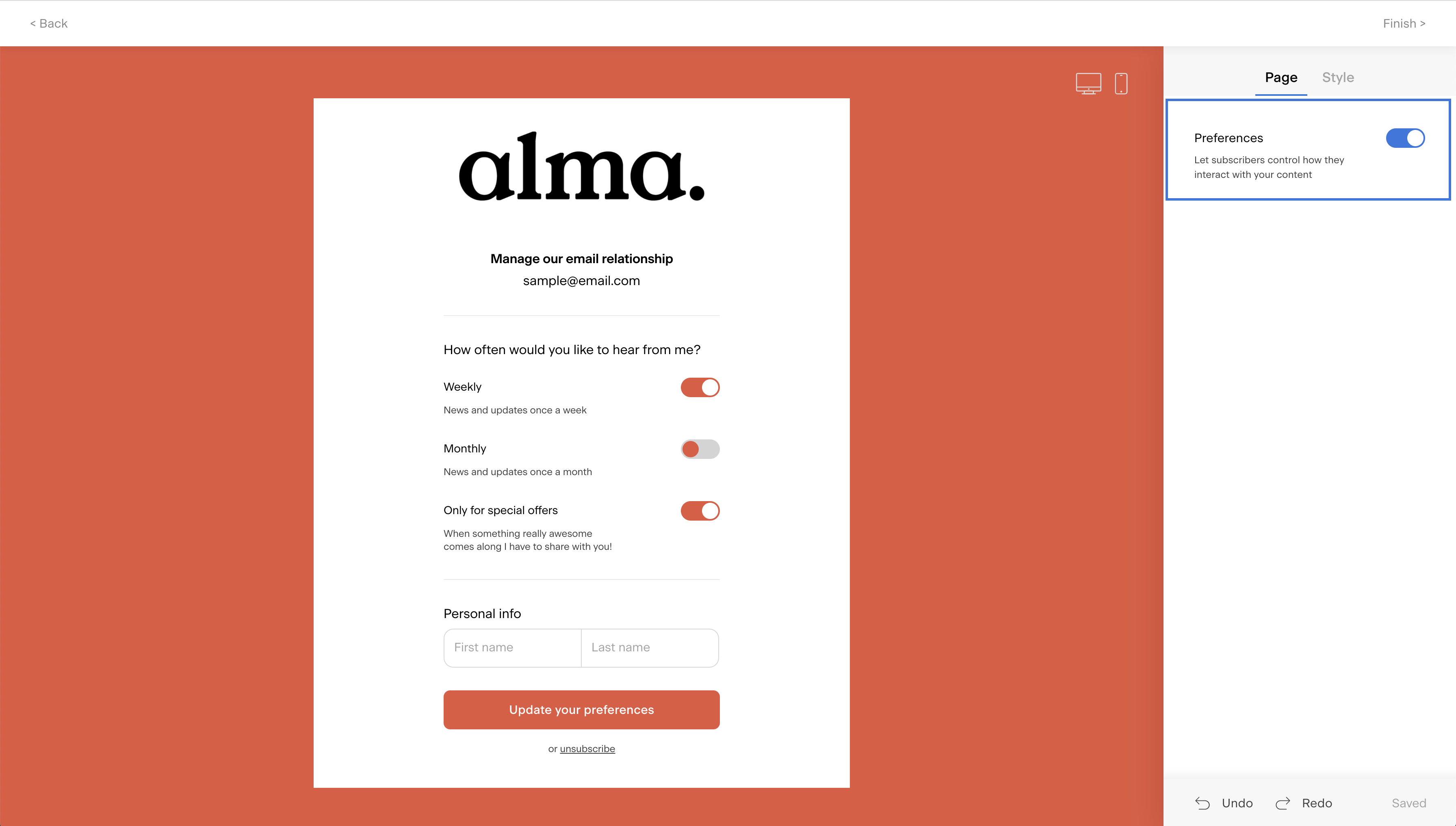
On your Preferences Page, you might ask:
How often do you want to hear from us?
Weekly
Monthly
Quarterly
If someone chooses “Weekly,” you can add them to a Weekly segment and send more frequent updates to that group.
Are Preferences on Forms connected to the Preferences Page?
No. These two systems are separate.
That means:
Preferences on Forms do not automatically sync with the Preferences Page
Preferences on the Preferences Page do not automatically affect your forms
You choose how to structure each one.
You have full flexibility
You can:
Make them identical (same options on both)
Make them completely different
Use forms for content topics and the Preferences Page for frequency
Use both for advanced personalization
It’s entirely up to you.
When should I use each one?
Use Preferences on Forms when:
You want to personalize from the start
You offer multiple content types
You want subscribers to self-select their interests immediately
Use the Preferences Page when:
You want subscribers to adjust their experience later
You want to reduce unsubscribes
You want to give subscribers more control
Most brands benefit from using both.
Summary
Preferences on Forms personalize the experience at sign-up.
The Preferences Page personalizes the experience over time.
They are separate systems.
You control how they work together.
When used intentionally, they help you send more relevant emails—which leads to higher engagement and fewer unsubscribes.
FAQs
Do I have to use both Preferences on Forms and the Preferences Page?
No. You can use one, both, or neither. Many brands use both for maximum flexibility.
If someone chooses an option on my form, will it show as selected on the Preferences Page?
Not automatically. The two systems are separate. If you want the same options available in both places, you’ll need to set them up accordingly.
Can subscribers unsubscribe from one topic but stay on my list?
Yes. That’s one of the main benefits of the Preferences Page. Instead of fully unsubscribing, subscribers can opt out of specific content types.
Can I collect frequency preferences on my form?
Yes. You can ask subscribers how often they’d like to hear from you when they sign up.
Do preferences automatically create segments?
No. Preferences do not automatically create segments.
You create the segments yourself and connect them to each preference option. This gives you full control over how subscribers are grouped and what emails they receive based on their selections.
For example, if you have a “Weekly” preference option, you would create a “Weekly” segment and link that preference to it.
What’s the main benefit of using preferences?
Relevance.
When subscribers choose what they want—and how often—they’re more likely to open, click, and stay subscribed.
And that’s the foundation of a healthy, engaged email list.