
Getting started with Flodesk Studio
Overview
Flodesk Studio is a new kind of email design web app, built for small business owners who want emails that look like a top brand made them, without spending hours in a builder. Whether you're a Flodesk member or you send your emails through a different provider, Studio gives you a faster, more beautiful way to design.
Describe what you want, and Flodesk Studio brings it to life: on-brand, polished, and ready for you to make your own. Import it into your Flodesk account and send from there, or export it to any email service provider (ESP) of your choice.
Flodesk Studio is free to use during beta. No credit card required.
How Flodesk Studio works
Flodesk Studio isn't just AI generating designs from scratch. The foundation is built by world-class in-house designers. AI then applies your brand and gets you most of the way there. You finish it your way.
Hours become seconds.
Designing an email used to mean picking a template, wrestling with layouts, and staring at a blinking cursor while you tried to match copy to design. Studio gets you 80% of the way there in a single prompt. You spend your time on the fun, creative part. Studio handles the heavy lifting.
Think of it in three steps:
You describe the email you want using a prompt: a short description of your goal, style, and audience. You can begin with whatever you have. Paste in some copy. Describe an idea in a sentence. Upload a brief. If you don't have a brand yet, start from one of Flodesk's gorgeous presets and make it yours from there. Studio meets you where you are.
Flodesk Studio generates emails that are unmistakably yours. Bring your brand into the studio. Upload your fonts, colors, images, voice and tone, and business context. Studio uses all of it to create emails that look and sound like you, not like generic AI output. The more Studio knows about your brand, the more magic it can make.
You edit your way. Some people love refining in conversation. Some people want to drag, drop, and adjust every pixel by hand. Studio supports both. Refine through chat. Fine-tune with manual controls, drag-and-drop, snap-to-grid, and hundreds of new layouts. You stay in the maker's seat the whole way through.
Who can use Flodesk Studio?
Anyone who sends email can use Flodesk Studio. You don't need to be a Flodesk member to get started.
You shouldn't have to switch platforms to design beautiful emails. Studio exports to any email service that supports HTML email, which means you can use it with Mailchimp, Klaviyo, Kit, Beehiiv, ActiveCampaign, and beyond. (It works best with Flodesk, of course, but that part is up to you.)
If you are an existing Flodesk member, you get one-click delivery: send your Flodesk Studio design straight into your Flodesk account without downloading anything.
How to access Flodesk Studio (first-time login)
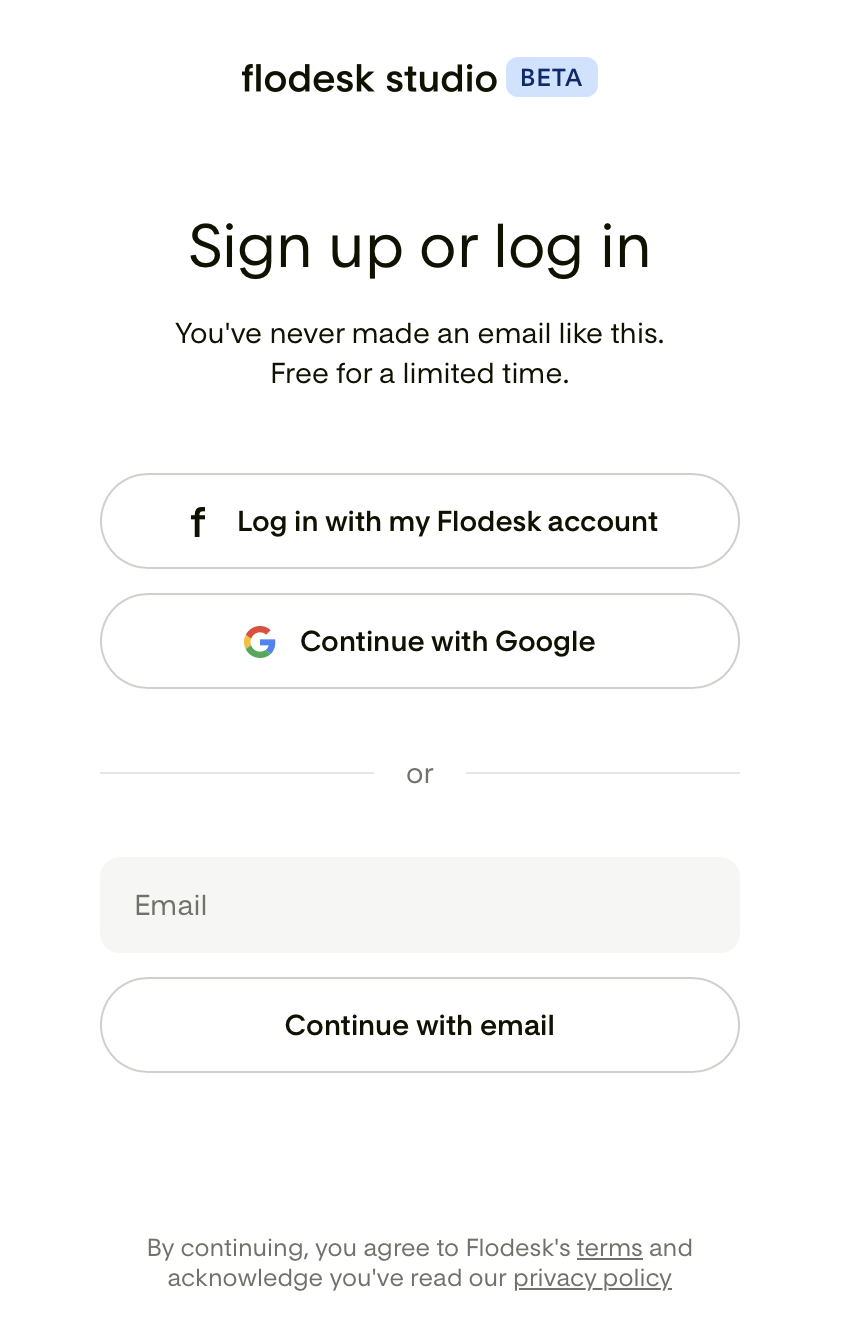
You can access Flodesk Studio at https://app.studio.flodesk.com/sign-in
If you're an existing Flodesk member, you still need to "create" an account for Flodesk Studio, as this is a separate web app. Note, however, that for this you can sign in directly with your Flodesk account by clicking "Log in with my Flodesk account". This will take you to a new screen where you can enter your Flodesk login credentials. Once done, Studio will connect to your main Flodesk account and import all your existing brand settings.
Signing up with separate login credentials: If you don't have a Flodesk.com account or want to use separate login credentials for Studio, you can sign up for Studio via Google SSO (Continue with Google) or by creating an account with a separate email address and password combination (Continue with email).
Flodesk Studio vs. the Flodesk email builder
Flodesk has two ways to create emails: Flodesk Studio and the Flodesk email builder. They're designed to work together.
Flodesk Studio
A standalone app, separate from your main Flodesk account
Uses AI to generate an on-brand email design from a quick description, giving you a strong starting point to refine
A faster way to get from blank canvas to a finished, on-brand design
Free during beta
The Flodesk email builder
Built into your original Flodesk account
Where you design emails hands-on, using pre-built templates and your own customizations
When to use Flodesk Studio
When you want AI to generate a starting point instead of designing from scratch
When you want to get a design most of the way there quickly, then refine it your way
When you want to explore a new look or layout without touching your existing Flodesk templates
When to use the Flodesk email builder
When you want to design an email yourself, start to finish
When you want to edit an email you originally created in the Flodesk email builder
How they work together
Design and refine your email in Studio until it's ready, then bring it into Flodesk to send. Once an email is in your Flodesk account, whether you built it there or designed it in Studio, it connects to everything else: send it to your list, and track its performance with Flodesk analytics. If you're a Flodesk member, you can send your Flodesk Studio design directly into your Flodesk account with one click.
What's available now, and what's coming
Studio is a human-created design system, accelerated by AI, perfected by you. We're shipping in public, which means feature requests can become reality in days, sometimes overnight. This also means your feedback shapes what gets built next. Use the in-app “Share feedback” link to share your ideas with us.
At launch, Flodesk Studio is focused on email. But email is just the start. Forms, pages, and more are on the way, based directly on what you ask for.
Every new addition will share the same foundation: real human design, accelerated by AI, finished by you.
Pricing
Flodesk Studio is free during beta. There's no credit card required and no hidden charges.
Pricing for after beta hasn't been set yet. If and when that changes, you'll be notified in advance.
FAQ
Is Flodesk Studio part of my Flodesk subscription?
No. Flodesk Studio is a separate, standalone app. It's free to use during beta, regardless of whether you have a paid Flodesk subscription.
If I build in Flodesk Studio, can I send directly from Flodesk?
Yes. You can send your design straight into your Flodesk account with one click and send from there.
Will my Flodesk Studio emails show up in my main Flodesk account automatically?
Not directly. Emails created in Flodesk Studio won't appear in your main Flodesk account until you export them there. They will then appear as draft emails on your Emails dashboard.
I can't log in to Flodesk Studio. What do I do?
First, double-check that you're using the correct email address and password for Flodesk Studio. If you've forgotten your password, click Forgot password on the login screen to reset it. Browser issues can sometimes prevent the login page from loading or working correctly. Here are a few things to try:
Clear your browser's cache and cookies, then try logging in again
Try opening Flodesk Studio in a different browser (Chrome, Safari, Firefox, etc.)
Try opening Flodesk Studio in a private or incognito window
Make sure your browser is up to date
Do I need a separate password for Flodesk Studio?
If you're an existing Flodesk member, you can sign in with your flodesk.com login credentials. You can also use Google Single Sign-On (SSO) or a separate email and password combination.
Where can I update my account details and manage my Studio password?
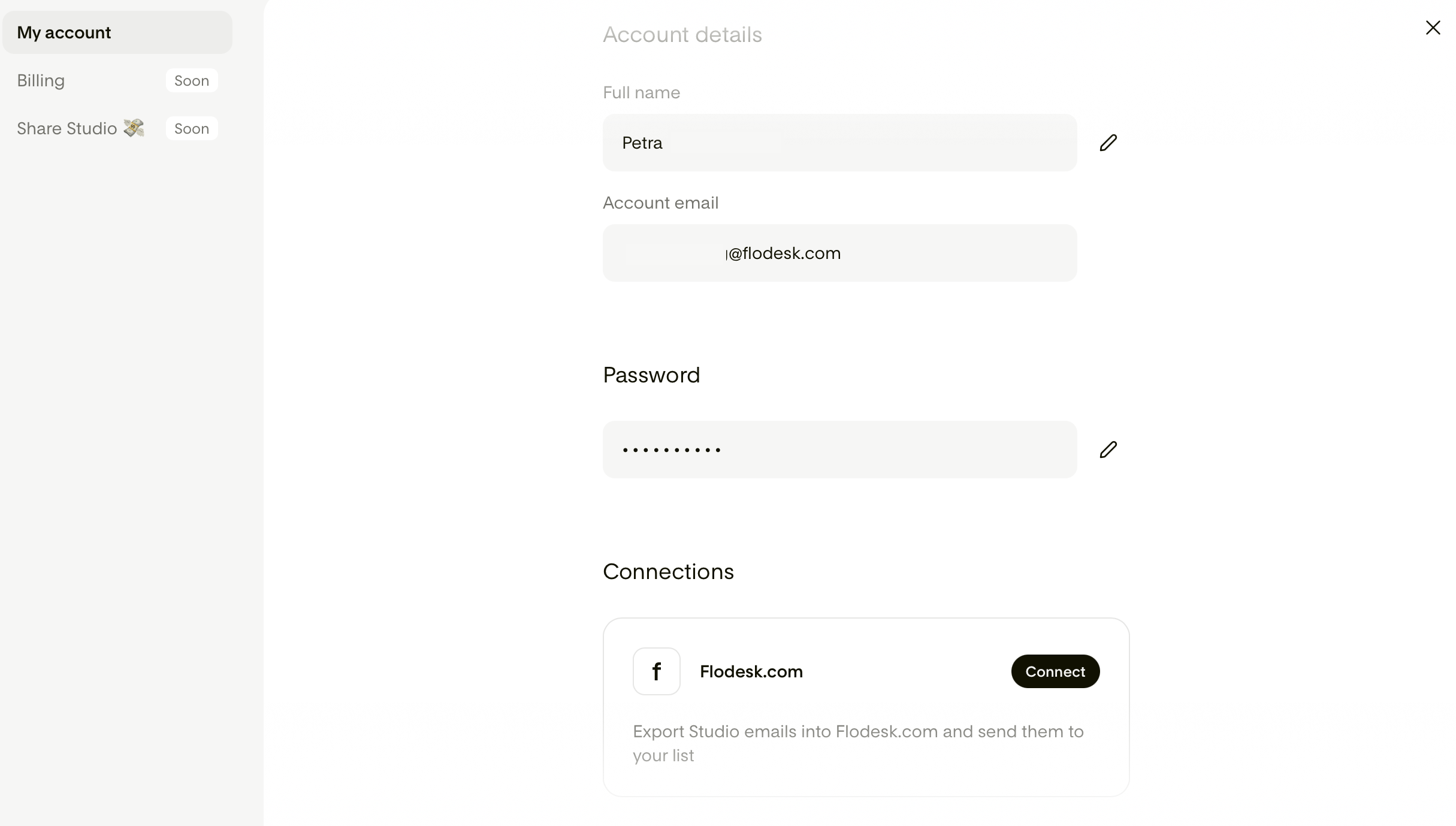
Click your account email address in the bottom-left corner to open the menu. Under "My account", you can manage your account details (full name) and password. Click the pencil icon to edit and then save your changes.
I'm on the Flodesk free trial. Can I still use Flodesk Studio?
Yes. Flodesk Studio is a standalone app and is available to all members, including those on the free trial.
Is Flodesk Studio free forever or will this become a paid add-on later?
Flodesk Studio is free during beta. Pricing beyond beta hasn't been decided yet. We'll communicate any changes clearly and in advance.
Is there a roadmap I can follow?
There isn't a public roadmap right now during beta. We're building and shaping Flodesk Studio based on your feedback. Use the in-app “Share feedback” box to share your ideas with us.
I tried to download Flodesk Studio from the App Store, but couldn't find it.
Great news: no download needed! When we say "standalone app," we mean it lives at its own web address rather than inside your main Flodesk account. There's no download needed. You can access Flodesk Studio right from your browser at https://app.studio.flodesk.com/sign-in
I'm worried about my subscriber list. If I use Flodesk Studio, does my audience data get shared with AI companies?
Your subscriber list and contacts live in Flodesk, not in Flodesk Studio. The two are separate apps, and there's currently no syncing between them: your audience data can't even be imported into Flodesk Studio. So your list isn't going anywhere near any AI companies, because it never enters Flodesk Studio at all.
The only information Flodesk Studio works with is what you explicitly give it, like your brand settings or anything you add while creating an email. When it comes to generating a draft, the content you're actively working on is processed by Anthropic, our AI provider, for that purpose only. That content is never used to train AI, and we don't sell it.
You stay in control of what you connect and what you share, every step of the way.
I'm a designer myself and I'm skeptical of AI-generated content. How do I know the designs coming out of Flodesk Studio aren't just copied from other designers' work?
The simplest way to think about Studio is that it's two layers working together. First, the design foundation: Every layout, block, and piece of the visual system was designed in-house by our team over the past year. We intentionally took our time because we wanted the creative foundation to be ours and to respect the work of designers. Studio isn't pulling from other designers' portfolios. It creates within the design system we built, using your brand settings as the foundation.
Second, the AI: Studio uses Claude by Anthropic to help generate copy and accelerate the creative process. What keeps the output from feeling generic is the guidance we've built into Studio, combined with your brand, voice, and inputs. You're always in control, reviewing, editing, and approving everything before it goes out.
Keep in mind that the output is just a starting point, not a finished product. With Studio's manual controls, you can edit, rewrite, or replace anything it generates, so the final result is your own. And just as importantly, neither Flodesk nor Anthropic uses your content to train AI. Your work stays yours.
So it's less "our designers vs. AI" and more "our designers built the creative foundation, AI helps you move faster within it, and you remain in the driver's seat."