
How to let subscribers repeat a workflow in Flodesk
Overview
By default, a subscriber can only go through a workflow once. But if you want to let someone re-experience the same workflow again, such as redownloading a freebie, retaking a mini-course, or going through a welcome sequence a second time, you can turn on the Allow repeat subscribers setting.
This article explains how to turn it on and, just as importantly, what needs to be true for it to actually work.
How to Turn On “Allow Repeat Subscribers”
Open the workflow you want to edit (or create a new one)
Click Settings in the top-right corner
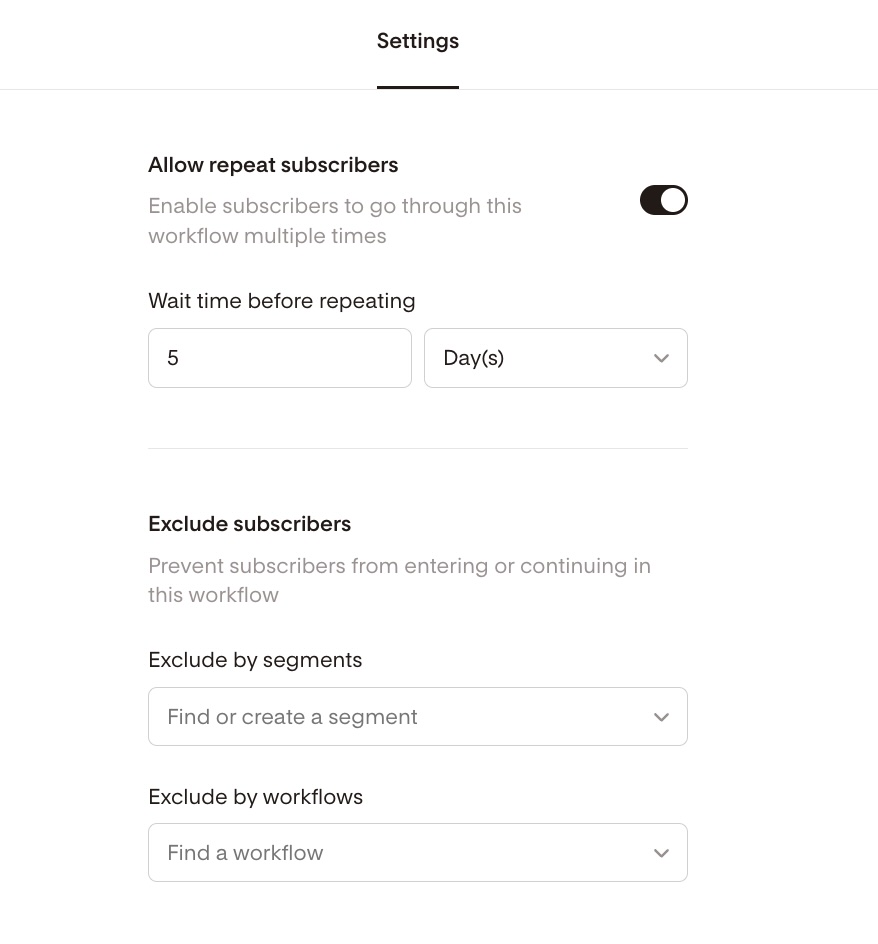
Toggle on Allow repeat subscribers
Set a Wait time before repeating (this is how long Flodesk will wait before allowing a subscriber to re-enter the workflow)
Close the settings panel and finish editing your workflow
Click Publish
Once this is on, subscribers can re-enter the workflow if they meet the trigger criteria again, as long as they're no longer active in it.
How repeat workflows actually work
Before subscribers can repeat a workflow, a few conditions need to be true. This is the part that trips most people up, so it's worth understanding before you set things up.
A subscriber must have completed the workflow first
A subscriber is only considered "completed" when they reach the Exit step at the end of the workflow. If your workflow doesn't have an Exit step and subscribers are just held at the end in an "evergreen" state, they're still considered active and won't be able to re-enter, even with Allow repeat subscribers turned on.
Tip: if you want subscribers to be able to repeat a workflow, make sure it has an Exit step.
A subscriber can't re-enter while they're still active
If a subscriber is currently moving through a workflow, they can't be added again. They need to either complete it (by reaching the Exit step) or be manually removed from it first.
Once they've completed or been removed, they can be re-added through any of these methods:
A form submission (if the form is the workflow trigger)
A link action set to add them to the workflow
A Zapier or Pabbly Connect automation
The manual "Add subscribers" option in the workflow menu
How to set up segment-based triggers for repeat workflows
If your workflow is triggered by a subscriber being added to a segment, there's an extra step to know about.
Adding someone to a segment they're already in won't trigger the workflow again. This is true regardless of whether Allow repeat subscribers is on. Flodesk only fires the trigger when a subscriber is newly added to the segment, not when they're already a member of it.
So if you want subscribers to repeat a segment-triggered workflow, you need to remove them from the trigger segment after their first run, then re-add them later to trigger the workflow again.
The easiest way to do this automatically:
Add an Action step at the end of your workflow that removes the subscriber from the trigger segment. This resets them so they can be added again later and re-trigger the workflow.
An example of how this works:
Segment A is the trigger for Workflow 1. A subscriber joins Segment A, goes through the workflow, and reaches the Exit step.
Later, they submit a form that adds them to Segment A again. But since they're still in Segment A, the workflow won't trigger.
To fix this: add an Action step in the workflow that removes them from Segment A when they complete it. Then, when they submit the form and are added to Segment A again, the workflow fires as expected.
An even simpler alternative: use a form submission as the workflow trigger instead of a segment. This sidesteps the segment membership issue entirely, since each new form submission is treated as a fresh trigger regardless of segment status.
Best uses for repeat workflows
Let subscribers redownload a freebie they've lost or want again
Re-send an onboarding or welcome sequence to returning subscribers
Trigger webinar reminder replays
Let subscribers retake a challenge or campaign each time it runs
FAQ
How do I let a subscriber go through a workflow more than once?
Go to your workflow settings and turn on Allow repeat subscribers. Set a wait time before repeating. Once enabled, subscribers can re-enter the workflow after completing it (by reaching the Exit step) or after being manually removed from it.
Why isn't a subscriber re-entering the workflow even though "Allow repeat subscribers" is on?
There are two common reasons. First, the subscriber may still be active in the workflow. They need to reach the Exit step or be manually removed before they can re-enter. Second, if your workflow is triggered by a segment, the subscriber may still be in that segment. Adding someone to a segment they're already in won't trigger the workflow again. Remove them from the segment first, then re-add them.
Does my workflow need an Exit step for this to work?
Yes. A subscriber is only considered "completed" when they reach the Exit step. If your workflow holds subscribers at the end without an Exit step, they'll remain in an active state and won't be able to re-enter even with Allow repeat subscribers turned on. Adding an Exit step at the end of your workflow is the fix.
My workflow is triggered by a segment. How do I let subscribers repeat it?
Add an Action step near the end of your workflow that removes the subscriber from the trigger segment. This resets their segment membership so that when they're re-added to the segment later (through a form, CSV import, or another method), the workflow will trigger again. Alternatively, use a form submission as the trigger instead of a segment, which avoids this issue entirely.
Can I use a form submission to re-trigger a workflow?
Yes, and this is often the simplest approach. If you use a form submission as the workflow trigger (rather than a segment), each new submission is treated as a fresh trigger. This means subscribers can re-enter the workflow each time they submit the form, without needing to manage their segment membership.
What's the difference between a subscriber who is "active" and one who has "completed" a workflow?
An active subscriber is currently moving through the workflow steps. A completed subscriber has reached the Exit step at the end. Only completed subscribers (or those who have been manually removed) can re-enter a workflow. Subscribers who are held at the end of a workflow without an Exit step are still considered active.
Can I manually re-add a subscriber to a workflow they've already completed?
Yes. Once a subscriber has completed the workflow (reached the Exit step), you can re-add them manually using the Add subscribers option in the workflow menu, through a link action, a form submission, or a Zapier or Pabbly Connect automation.
How long do I have to wait before a subscriber can repeat a workflow?
That's up to you. When you turn on Allow repeat subscribers, you'll set a "Wait time before repeating." This is the minimum amount of time Flodesk will wait before allowing a subscriber to re-enter the workflow after completing it.